
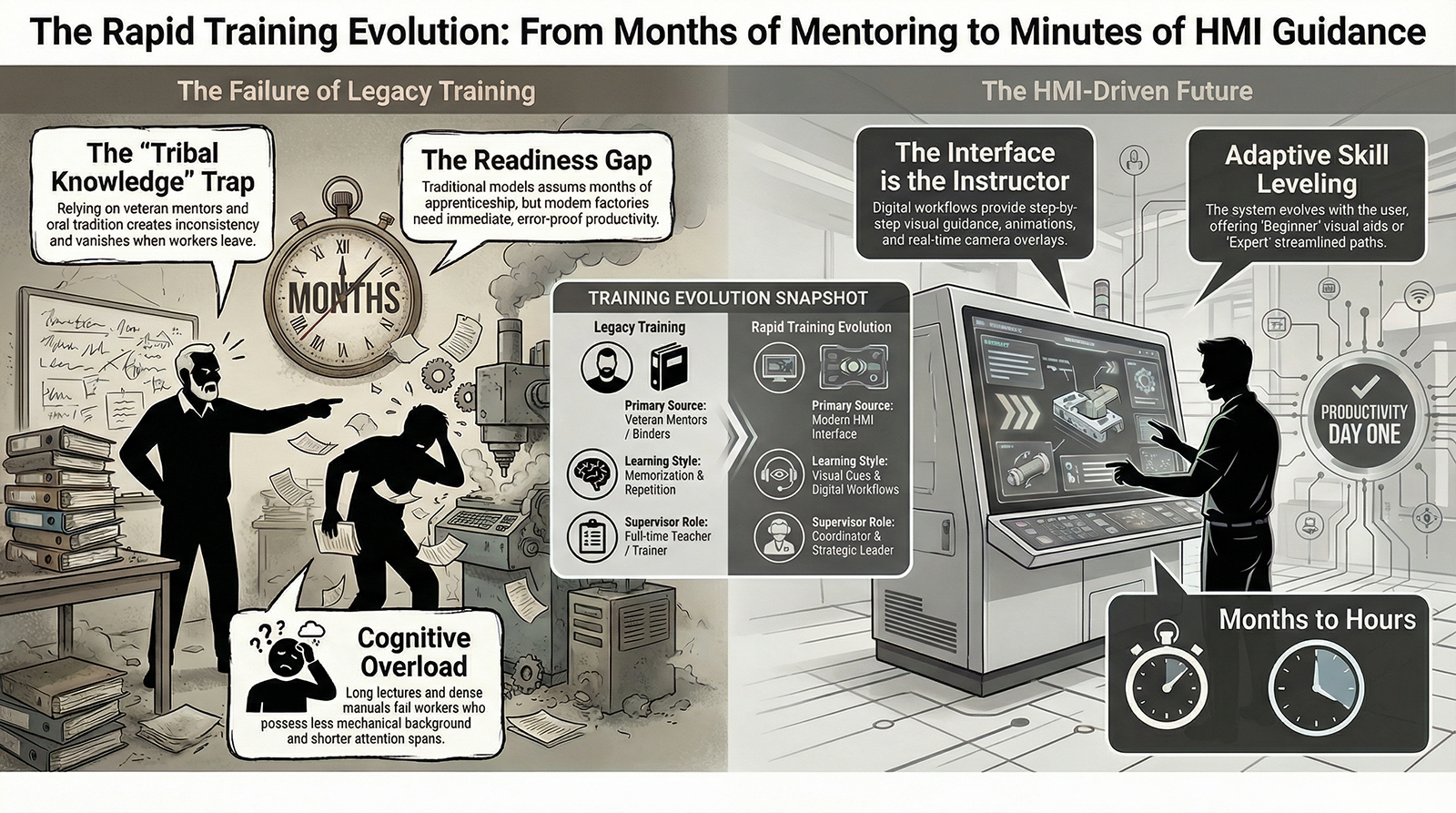
Rapid Training

The Rapid Training Evolution:

How Modern HMIs Cut Training Time From Months to Hours**

Executive Summary

The manufacturing workforce has changed forever.

Turnover is higher.
Experience is lower.
Attention spans are shorter.
Tribal knowledge is evaporating.
Machines are more complex.
Expectations are increasing.

Factories used to rely on:

  • Shadowing
  • Oral tradition
  • Long apprenticeships
  • Classroom sessions
  • Repetition
  • Veteran mentoring
  • Trial-and-error

That era is gone.

Factories now need workers ready on Day One.
Not after six weeks.
Not after ten cycles of mistakes.
Not after being babysat by a senior operator.

This is the Rapid Training Evolution
a new training model built around modern HMIs that teach as you work, guide every action, eliminate guesswork, and create instant capability.

Training doesn’t happen before the job.
Training happens in the job.

And it evolves as fast as the workforce demands.

  1. Traditional Training Cannot Keep Up With Modern Manufacturing

Legacy training models assume:

  • Workers stay for years
  • Apprenticeship is normal
  • People learn mechanically through repetition
  • Experienced mentors are always available
  • Workers absorb dense technical information

But the reality is:

❌ Workers come with little mechanical background

❌ New hires have minutes of attention, not days

❌ Turnover wipes out knowledge

❌ Veteran operators are overbooked

❌ Training time destroys production time

❌ Complexity grows faster than capability

Factories need training that adapts to the worker — not the other way around.

  1. The Rapid Training Evolution Delivers Skill Through the HMI Itself

Modern HMIs must do more than display information.

They must:

✔ Teach

✔ Guide

✔ Explain

✔ Confirm

✔ Warn

✔ Correct

✔ Sequence

✔ Coach

✔ Support

The HMI becomes the primary trainer.

Not a supervisor.
Not a binder.
Not a tribal expert.
Not a classroom.

The interface becomes the instructor.

This is the future.

  1. Training Becomes Visual, Not Verbal

Traditional training requires:

  • Listening
  • Memorizing
  • Note-taking
  • Remembering steps
  • Interpreting explanations
  • Asking clarifying questions

Modern workers struggle with this.

The Rapid Training Evolution replaces lectures with visuals:

✔ Animations

✔ Photos of correct orientation

✔ Videos of each step

✔ Highlighted components

✔ Before/after visuals

✔ Quality comparison images

✔ Real-time camera overlays

Humans don’t learn best from words.
They learn best from seeing.

  1. Step-by-Step Guided Workflows Become Digital Training

Instead of teaching a changeover once and hoping it sticks, the HMI:

✔ Guides the user

✔ Locks sequence

✔ Shows visual confirmation

✔ Blocks dangerous actions

✔ Removes unnecessary steps

✔ Times progress

✔ Confirms completion

✔ Tracks common mistakes

This turns the changeover from a “tribal event” into a repeatable, error-proofed training sequence.

Workers learn the correct way — and only the correct way.

  1. Training Evolves in Real Time as Users Interact With the System

The system adapts to the user:

Beginner Mode

  • More visuals
  • Slower pacing
  • More confirmations
  • More training tips

Intermediate Mode

  • Faster navigation
  • Condensed steps
  • Fewer prompts

Expert Mode

  • Quick access
  • Streamlined paths
  • Advanced troubleshooting tools

Training evolves as the worker evolves.

  1. The Rapid Training Evolution Eliminates the Dependency on Tribal Knowledge

Factories used to rely on:

“Ask Bill, he knows the trick.”
“Only Maria knows how to fix that jam.”
“You’ll learn it when you see it happen.”
“That’s just how we’ve always done it.”

This destroys consistency.

Modern HMIs:

  • Capture expert knowledge
  • Convert it into digital workflows
  • Deliver it at the exact moment it’s needed
  • Make every operator capable
  • Preserve knowledge permanently

Tribal knowledge becomes digital knowledge.

  1. The Rapid Training Evolution Accelerates Maintenance Capability

Maintenance used to take:

  • Years of experience
  • Tribal onboarding
  • Deep mechanical familiarity
  • Pattern recognition
  • Trial-and-error under pressure

Now the HMI provides:

✔ Fault explanation

✔ Likely causes

✔ Visual component maps

✔ Step-by-step repair sequences

✔ Predictive warnings

✔ Required tools checklists

✔ Verification steps

Maintenance techs become productive dramatically faster.

  1. Supervisors Shift From Trainers to Coordinators

Traditional supervisors spend:

  • 30% of their time training
  • 40% correcting mistakes
  • 20% troubleshooting
  • 10% actually supervising
  • 0% improving anything

With modern HMIs:

✔ The HMI trains

✔ The HMI guides

✔ The HMI enforces sequence

✔ The HMI documents performance

✔ The HMI flags skill gaps

Supervisors stop being teachers —
they become leaders.

  1. The Rapid Training Evolution Reduces Turnover

Workers leave because:

  • They feel confused
  • They feel overwhelmed
  • They feel unsupported
  • They feel like they are failing
  • They feel unsafe
  • They don’t understand the job

The new HMI experience:

✔ Builds confidence

✔ Reduces stress

✔ Creates clarity

✔ Makes success obvious

✔ Gives instant feedback

✔ Makes the job easier

Confidence is retention.
Clarity is retention.
Guidance is retention.

**10. Conclusion:

The Rapid Training Evolution Is Not Optional — It Is Survival**

Factories cannot rely on:

  • Classroom learning
  • Long apprenticeship
  • Veteran mentoring
  • Mechanical intuition
  • Memorized steps
  • Trial-and-error
  • Old HMIs
  • Tribal expertise

The modern workforce requires:

✔ Immediate capability

✔ Visual instruction

✔ Step-by-step workflows

✔ Predictive guidance

✔ Skill-on-demand

✔ Training built into the interface

This is the Rapid Training Evolution.

Training is no longer something workers receive.

Training is something the system provides — continuously, visually, and intelligently.

This is how factories will thrive in the next decade.

FOCUS Integration – Episode 9 – The Rapid Training Revolution (Video Notes)
https://youtu.be/sOKgXNQICDE

FOCUS Integration – Episode 9 – The Rapid Training Revolution (Audio Notes)
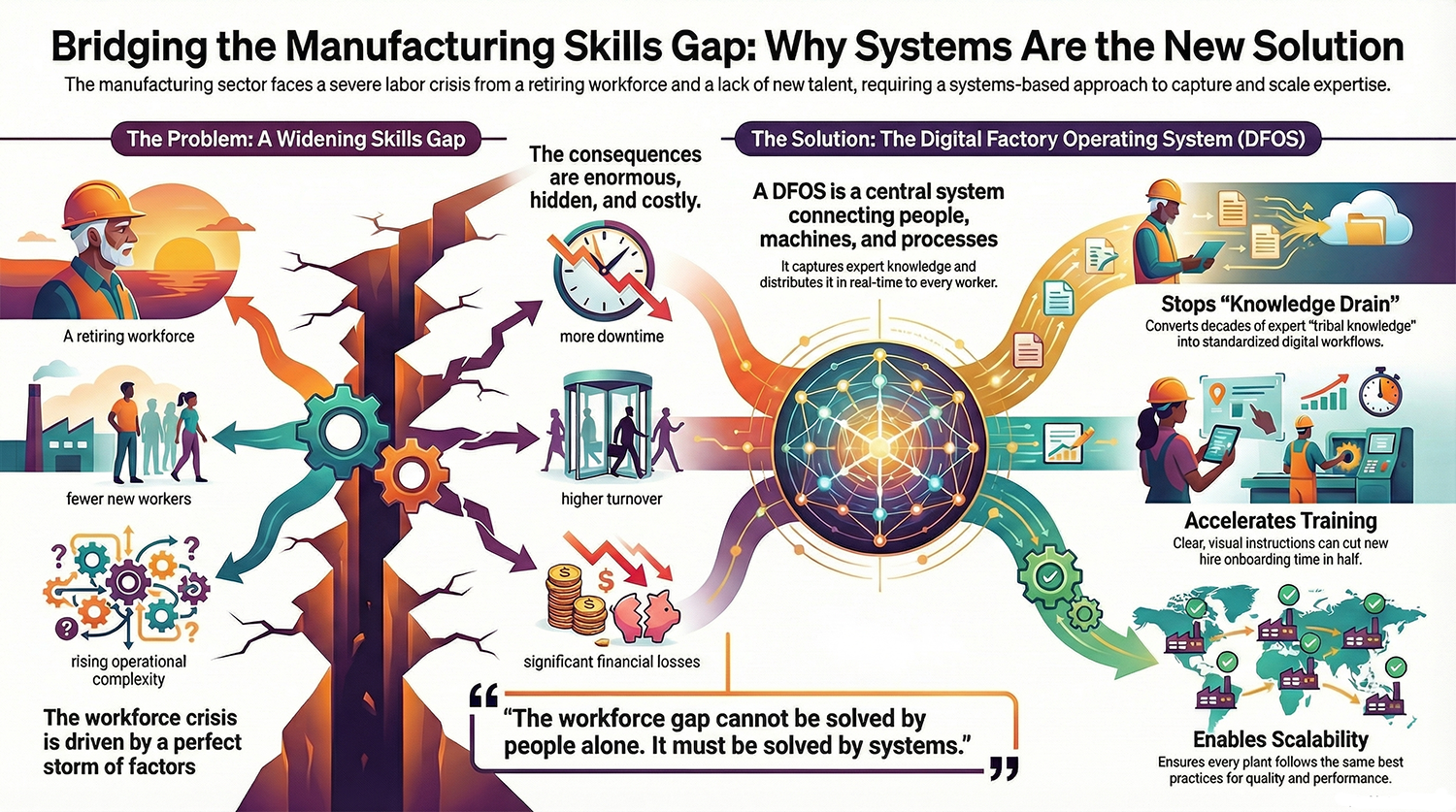
beyond dashbaords

Beyond OEE Dashboards:

What a True Factory Operating System Should Actually Do**

Executive Summary

For years, manufacturers have been told that digital transformation begins with dashboards — colorful displays of OEE, downtime, scrap rates, and production numbers. And while dashboards are useful, they are also deeply limited.

Dashboards report.
Factories must operate.

A dashboard can tell you that production is behind.
A factory operating system (FOS) tells you why, what to do next, and who needs to do it.

Dashboards visualize data.
A factory operating system drives behavior.

Dashboards live in conference rooms and supervisor offices.
A factory operating system lives on the shop floor, powering decision-making for operators, technicians, supervisors, and leadership in real time.

This article explores why dashboards alone cannot unlock modern manufacturing performance — and what a real operating system must provide to make the factory safer, smarter, faster, and more resilient.

  1. The Problem with Dashboard-Centric Thinking

Over the past decade, many manufacturers invested heavily in:

  • OEE dashboards
  • Downtime reporting tools
  • Production-monitoring apps
  • Custom spreadsheets
  • Office-based KPI displays

But a shocking number of these systems have failed to deliver real value.

Why?

Because dashboards have three critical limitations:

Limitation #1 — Dashboards show the symptom, not the cause

A dashboard can tell you:

  • OEE dropped
  • Scrap spiked
  • Throughput slowed
  • Downtime increased

But dashboards do not tell you:

  • Who was involved
  • What happened before the issue
  • What procedure was followed
  • What operator actions led to the failure
  • Which workflow broke down
  • How the issue should be escalated

Dashboards are mirrors — not maps.

Limitation #2 — Dashboards don’t change operator behavior

Operators don’t stare at dashboards.
They stare at machines, parts, workstations, and paperwork.

By the time someone looks at the dashboard, the problem already happened.

Dashboards are backward-looking.
Factory operations must be forward-guiding.

Limitation #3 — Dashboards live in offices, not on the floor

Operators need:

  • Prompts
  • Warnings
  • Clear instructions
  • Escalation paths
  • Contextual guidance

Dashboards don’t provide these.

Most dashboards serve leadership, not frontline workers.

  1. What Is a Factory Operating System?

A factory operating system (FOS) is a unified digital layer that connects:

  • Machines
  • People
  • Data
  • Workflows
  • Safety systems
  • Quality systems
  • Material movement
  • Planning and scheduling
  • Training and procedures
  • Visual management boards

It replaces the patchwork of:

  • Clipboards
  • Whiteboards
  • Paper SOPs
  • Radio calls
  • Tribal knowledge
  • Disconnected software

with a single architecture that governs how the factory runs.

The FOS becomes the brain and nervous system of the plant — coordinating information flow and guiding action in real time.

  1. The Five Core Capabilities of a True Factory Operating System

Dashboards only provide one of these five.
A complete factory OS must do all of them.

  1. Real-Time Visibility (Dashboards + Visual Boards + Alerts)

Yes, dashboards matter — but in the context of a larger system.

A factory OS must:

  • Display live performance
  • Show safety and quality metrics
  • Highlight abnormalities instantly
  • Provide takt time tracking
  • Surface deviations visually on the shop floor

This is the information layer.

But it is not enough on its own.

  1. Standardized Workflows and Digital Procedures

A real factory cannot rely on memory or inconsistent training.

A true FOS must:

  • Deliver step-by-step instructions
  • Enforce sequence control
  • Provide verification steps
  • Allow quick updates to procedures
  • Record who did what and when
  • Support photos, videos, diagrams, and AR

This is the execution layer.

It ensures every worker performs the task correctly every time.

  1. Role-Based Guidance and Escalation

When something goes wrong, workers should not guess:

  • Who to call
  • What to do
  • Where to go
  • What standard to follow
  • What the priority is

A real operating system:

  • Offers guided troubleshooting
  • Auto-assigns the right responder
  • Sends multi-channel alerts
  • Displays the issue on nearby screens
  • Tracks response time
  • Ensures follow-through

This is the coordination layer.

It prevents chaos, confusion, and delay.

  1. Integrated Human + Machine Intelligence

A factory OS must combine:

  • Machine data (PLC signals, sensors)
  • Operator actions (inputs, responses, observations)
  • Environmental data
  • Quality measurements
  • Maintenance records

This enables:

  • Real root cause analysis
  • Predictive maintenance
  • Better staffing decisions
  • Quality interventions
  • Energy optimization

This is the insight layer.

Dashboards cannot do this alone — they only display the data, not integrate it into workflows.

  1. Continuous Improvement and Governance

A digital OS must support:

  • Kaizen
  • Tier meetings
  • Issue logging
  • Action item tracking
  • Multi-shift continuity
  • Skills matrices
  • Audit trails

It enforces the rhythm of improvement the same way an ERP enforces financial structure.

This is the governance layer.

It ensures the factory doesn’t drift into tribal processes or “hero culture.”

  1. The Key Insight: Dashboards Measure Performance — Operating Systems Improve It

A dashboard can show that downtime increased.
A real factory OS:

  • Shows the downtime
  • Identifies the cause
  • Traces operator actions
  • Triggers standard troubleshooting steps
  • Notifies the right person
  • Displays the escalation on big boards
  • Tracks progress
  • Captures lessons learned
  • Updates the workflow to prevent recurrence

Dashboards are passive.
A factory operating system is active.

Dashboards observe.
A factory OS intervenes.

  1. Why the Shift Away From Dashboard-Only Thinking Is Accelerating

Manufacturers are realizing that:

You cannot manage today’s workforce with yesterday’s tools.

Frontline workers need structured digital guidance, not analog instructions.

You cannot manage today’s automation with yesterday’s workflows.

Robot cells, AGVs, and complex machinery require coordinated responses, not manual improvisation.

You cannot manage today’s scheduling and demand with yesterday’s visibility.

Real-time data is essential for meeting takt, not historical reports.

A dashboard-only approach is like trying to run a modern car with only a speedometer — and none of the warning systems, navigation, automation, or driver assistance features.

  1. What the Factory of the Future Will Look Like

The next generation of factories will be built around:

A shared visual layer

Large screens showing live performance, safety, and priority signals for everyone.

A digital nervous system

Operators, machines, and workflows connected through one OS.

Automated coordination

Escalations routed intelligently by role and urgency.

Standardization across sites

One system, one language, one way of working.

Operators empowered with guidance

Not just told what happened — shown what to do.

Data becoming behavior

Not just numbers — actions.

The difference between a dashboard-driven plant and an OS-driven plant will soon be as dramatic as the difference between a flip phone and a smartphone.

Conclusion: Dashboards Are the Beginning, Not the Destination

Modern factories require more than visibility.
They require structure, coordination, and real-time behavior shaping.

A dashboard tells you what happened.
A factory operating system makes the right thing happen.

This is the future of operational excellence:

  • Connected
  • Guided
  • Standardized
  • Visualized
  • Coordinated
  • Scalable

Dashboards alone cannot transform a factory.
A factory OS can transform everything.


FOCUS Integration – Episode 3 – Beyond Dashboards (Video Notes)


FOCUS Integration – Episode 3 – Beyond Dashboards (Audio Notes)