5 Signs Your Manufacturing Process Needs Automation


Modern manufacturing rarely breaks overnight. It doesn’t collapse—it erodes. Small inefficiencies stack up. Processes slow down. Costs creep up. Quality fluctuates. And before long, what used to work just… doesn’t anymore.

The challenge is that many of these issues feel “normal” because they develop gradually. Teams adapt. Workarounds become standard practice. Problems get patched instead of solved.

Automation is often seen as a big leap—but in reality, it’s usually the logical next step when your current process has outgrown itself.

If you’re unsure whether it’s time, here are five clear, real-world signs that your operation is ready for automation.


1. Labor Bottlenecks Are Limiting Your Output

One of the clearest indicators that you need automation is when your production capacity is directly tied to how many people you can put on the floor.

At first, this might not seem like a problem. Hiring more workers feels like a straightforward solution. But over time, you start to notice constraints:

  • You can’t hire fast enough to meet demand
  • Training new employees slows down production
  • Overtime becomes the only way to keep up
  • Productivity varies widely between shifts

This creates a ceiling on your output—one that becomes increasingly difficult (and expensive) to break through.

Automation changes this dynamic entirely.

Instead of scaling production by adding labor, you scale by increasing system capacity. A well-designed automated system can run continuously, maintain consistent cycle times, and eliminate the variability that comes with manual processes.

More importantly, it gives you predictability.

When your output is predictable, you can:

  • Commit to tighter delivery timelines
  • Take on larger contracts with confidence
  • Plan production schedules more effectively

If your growth is being limited by how many people you can hire, you’re not dealing with a staffing issue—you’re dealing with a scalability problem. And that’s exactly what automation solves.


2. High Turnover in Repetitive or Physically Demanding Roles

There’s a reason certain positions are always open.

Repetitive, physically demanding jobs—like palletizing, material handling, or machine tending—tend to have the highest turnover rates in manufacturing environments.

These roles often involve:

  • Repeating the same motion hundreds or thousands of times per shift
  • Lifting heavy or awkward loads
  • Working in uncomfortable or hazardous conditions
  • Limited opportunity for skill development

Even your best employees will struggle to stay engaged in these positions long-term.

The result?

  • Constant hiring cycles
  • Ongoing training costs
  • Lower overall team experience levels
  • Increased risk of errors and accidents

This isn’t just a workforce issue—it’s an operational inefficiency.

Automation allows you to remove people from the roles that are hardest to retain and hardest on the body, and reallocate them to positions that require judgment, problem-solving, and oversight.

Instead of asking:
“Who can we hire to do this job?”

You start asking:
“Should a person be doing this job at all?”

Companies that make this shift often see:

  • Improved employee retention
  • Higher job satisfaction
  • Stronger team performance overall

Because the reality is—automation doesn’t eliminate jobs. It eliminates the least sustainable ones.


3. Inconsistent Product Quality and Process Variability

In manufacturing, consistency is everything.

But manual processes introduce variability—no matter how skilled your workforce is.

Different operators perform tasks slightly differently:

  • Placement might be off by a fraction
  • Timing might vary between cycles
  • Fatigue can impact precision over time

Individually, these differences seem minor. But over thousands of cycles, they add up to:

  • Increased scrap rates
  • Rework
  • Customer complaints
  • Quality control bottlenecks

And perhaps most importantly—lost trust.

Automation excels in environments where repeatability matters.

A properly designed system will:

  • Perform the same motion the same way every time
  • Maintain consistent cycle timing
  • Reduce reliance on manual adjustments

This doesn’t just improve quality—it stabilizes your entire process.

When your process is stable:

  • Quality becomes predictable
  • Inspection becomes easier
  • Waste is reduced
  • Customer confidence increases

It’s important to note that automation doesn’t just fix bad processes—it reveals them. That’s a good thing.

Because once variability is removed, you can clearly see where improvements need to be made.

If your team spends a significant amount of time managing inconsistencies instead of producing output, it’s a strong signal that automation could bring immediate value.


4. Safety Risks Are Becoming a Concern

Safety isn’t just a compliance issue—it’s a business issue.

In many manufacturing environments, certain tasks inherently carry risk:

  • Repetitive lifting and strain injuries
  • Interaction with heavy machinery
  • Exposure to hazardous materials
  • Awkward or confined working positions

Even with proper training and PPE, these risks don’t disappear—they’re just managed.

And over time, they add up:

  • Workplace injuries
  • Increased insurance costs
  • Lost productivity
  • Lower employee morale

Automation offers a way to remove people from the most dangerous parts of the process entirely.

Robots don’t get tired. They don’t lose focus. They don’t take shortcuts.

They’re ideal for:

  • Heavy lifting
  • Repetitive motion
  • High-temperature or hazardous environments
  • High-speed operations

By automating high-risk tasks, you’re not just improving safety—you’re creating a more sustainable workplace.

And that has ripple effects:

  • Employees feel more valued and protected
  • Retention improves
  • Your company becomes more attractive to new hires

In today’s labor market, that matters more than ever.

If safety incidents—or even near-misses—are becoming more frequent, it’s not just a warning sign. It’s a call to action.


5. You’re Losing Business Due to Lead Times or Capacity Constraints

This is often the tipping point.

You’re getting opportunities—but you can’t take full advantage of them.

Maybe:

  • Your lead times are longer than competitors
  • You’re turning down work because you’re at capacity
  • Customers are asking for faster turnaround than you can deliver
  • Your team is constantly in “catch-up mode”

At this stage, the cost of not automating becomes very real.

Because every missed opportunity is:

  • Lost revenue
  • Lost market share
  • Potentially lost long-term customers

Automation allows you to compress timelines and increase responsiveness.

Instead of reacting to demand, you can keep up with it—or even stay ahead of it.

Faster production cycles mean:

  • Shorter lead times
  • Greater flexibility
  • Ability to handle rush orders
  • More competitive positioning

And in many industries, speed is the differentiator.

It’s not just about who can produce—it’s about who can deliver fastest and most reliably.

If your sales team is being held back by your production capabilities, automation isn’t just an operational upgrade—it’s a growth strategy.


The Bigger Picture: Automation as a Strategic Shift

Each of these signs—labor bottlenecks, turnover, inconsistency, safety concerns, and missed opportunities—points to the same underlying issue:

Your current process has reached its limit.

Automation isn’t about replacing people or chasing trends. It’s about removing the constraints that prevent your business from growing.

It allows you to:

  • Scale without chaos
  • Improve without overloading your team
  • Compete in a faster, more demanding market

And perhaps most importantly—it gives you control.

Instead of constantly reacting to problems, you can design a system that works by default.


Final Thought

Most companies wait too long to automate.

They wait until problems become urgent. Until inefficiencies become costly. Until opportunities are already lost.

But the companies that win are the ones that recognize the signs early—and act on them.

If even one of these challenges feels familiar, it’s worth taking a closer look at your process.

Because the question isn’t:
“Can we afford to automate?”

It’s:
“How long can we afford not to?”

FOCUS Integration – 5 Signs Your Manufacturing Process Needs Automation  (Video Notes)

FOCUS Integration – 5 Signs Your Manufacturing Process Needs Automation  (Audio Notes)
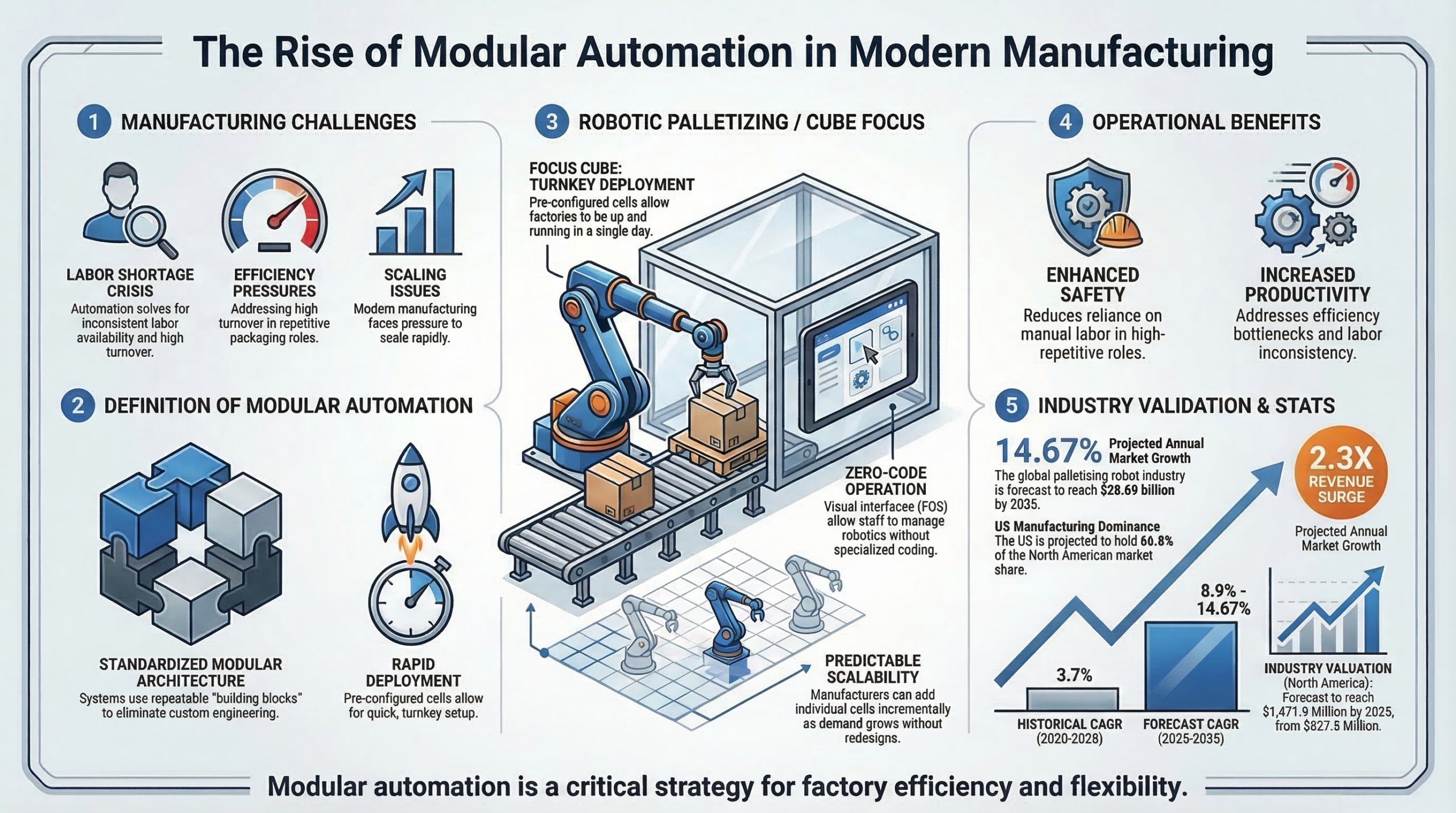
The Case for Modular Automation in Modern Manufacturing

Manufacturing leaders across North America are facing a convergence of pressures that would have seemed unlikely just a decade ago. Customer expectations for faster delivery continue to rise, product variety is increasing, and labor availability remains inconsistent in many regions. At the same time, manufacturers are under constant pressure to maintain cost competitiveness while improving safety and operational efficiency.

In this environment, automation is no longer simply a long-term technology investment. It has become a strategic operational decision.

However, the traditional approach to automation has not always aligned with the speed at which modern manufacturers need to adapt. Historically, large automation projects required months of engineering work, complex installation processes, and substantial capital commitments before delivering results. Systems were often designed from scratch, requiring custom layouts, extensive programming, and lengthy commissioning periods.

Today, a new approach is gaining traction: modular automation.

Modular automation systems are designed using standardized building blocks that can be deployed rapidly while still allowing customization for specific applications. Rather than reinventing the wheel for every installation, integrators develop repeatable architectures that dramatically shorten deployment timelines while maintaining flexibility.

One area where this model has proven particularly effective is robotic palletizing.

Palletizing is a critical step in nearly every manufacturing and packaging operation. Products must move from the production line into stable pallet loads that can be stored, transported, and distributed efficiently. Historically, this task relied heavily on manual labor, requiring workers to lift, stack, and organize cartons for extended periods.

While manual palletizing can be effective in small operations, it presents several long-term challenges for growing facilities. Repetitive lifting increases the risk of workplace injuries, staffing shortages can create bottlenecks in production, and inconsistent stacking patterns can compromise pallet stability.

Robotic palletizing systems address these issues by automating the process with precision and reliability.

Modern palletizing cells combine industrial robotics with integrated conveyors, safety systems, and intelligent controls. Products move along conveyor lines to a robotic pick point, where a robot lifts each box and places it into a defined stacking pattern on a pallet.

The robot performs the same task thousands of times per shift with consistent accuracy and speed.

What makes modular palletizing solutions particularly attractive is their predictable deployment process. Systems like the CUBE palletizing cell from FOCUS Integration demonstrate how modular architecture can transform the implementation timeline.

Instead of designing every component from scratch, the system is built around a standardized cell structure that integrates robotic technology, safety components, and conveyor interfaces into a compact and repeatable configuration.

This modular design dramatically simplifies installation.

Manufacturers can integrate the palletizing system with existing conveyor lines while minimizing disruption to production. Because the architecture has been refined across multiple deployments, commissioning time is reduced and operational reliability improves.

The advantages extend beyond installation.

Modular automation also improves scalability. Manufacturers can begin with a single palletizing cell and expand their automation footprint as production grows. Additional cells, conveyors, or robotic systems can be integrated into the facility over time without requiring a complete redesign of the production environment.

This approach allows automation to evolve alongside the business.

For many organizations, this incremental path to automation reduces both financial risk and operational complexity. Rather than committing to a large, multi-year automation initiative, companies can begin with targeted solutions that deliver immediate benefits.

From an operational perspective, the results are significant. Robotic palletizing systems improve throughput, maintain consistent pallet quality, and reduce reliance on manual labor for repetitive tasks. They also enhance workplace safety by removing one of the most physically demanding roles in the packaging process.

Equally important, these systems support a broader shift toward smarter manufacturing environments.

As factories adopt more connected equipment and data-driven production processes, modular automation solutions provide the flexibility needed to integrate with evolving technologies.

Manufacturers that embrace modular automation are not simply improving a single process. They are laying the groundwork for a production ecosystem that can adapt, scale, and compete in an increasingly dynamic industrial landscape.

The future of manufacturing will belong to organizations that can move quickly, implement technology effectively, and continuously refine their operations.

Modular automation is one of the most powerful tools available to make that future possible.

FOCUS Integration – Industry Deep Dive Episode 1 (Video Notes)

FOCUS Integration – Industry Deep Dive Episode 1 (Audio Notes)

The Future of the Factory Interface:

Where Intelligence, Visualization, and Human-Centered Design Merge Into One Unified Experience**

Executive Summary

For decades, factory interfaces lagged behind the complexity of the machines they controlled.

Machines evolved.
Automation advanced.
Robotics became intelligent.
Sensors exploded in capability.
Production lines became hyper-fast.

But HMIs?
They mostly stayed the same.

Now, a seismic shift is underway.

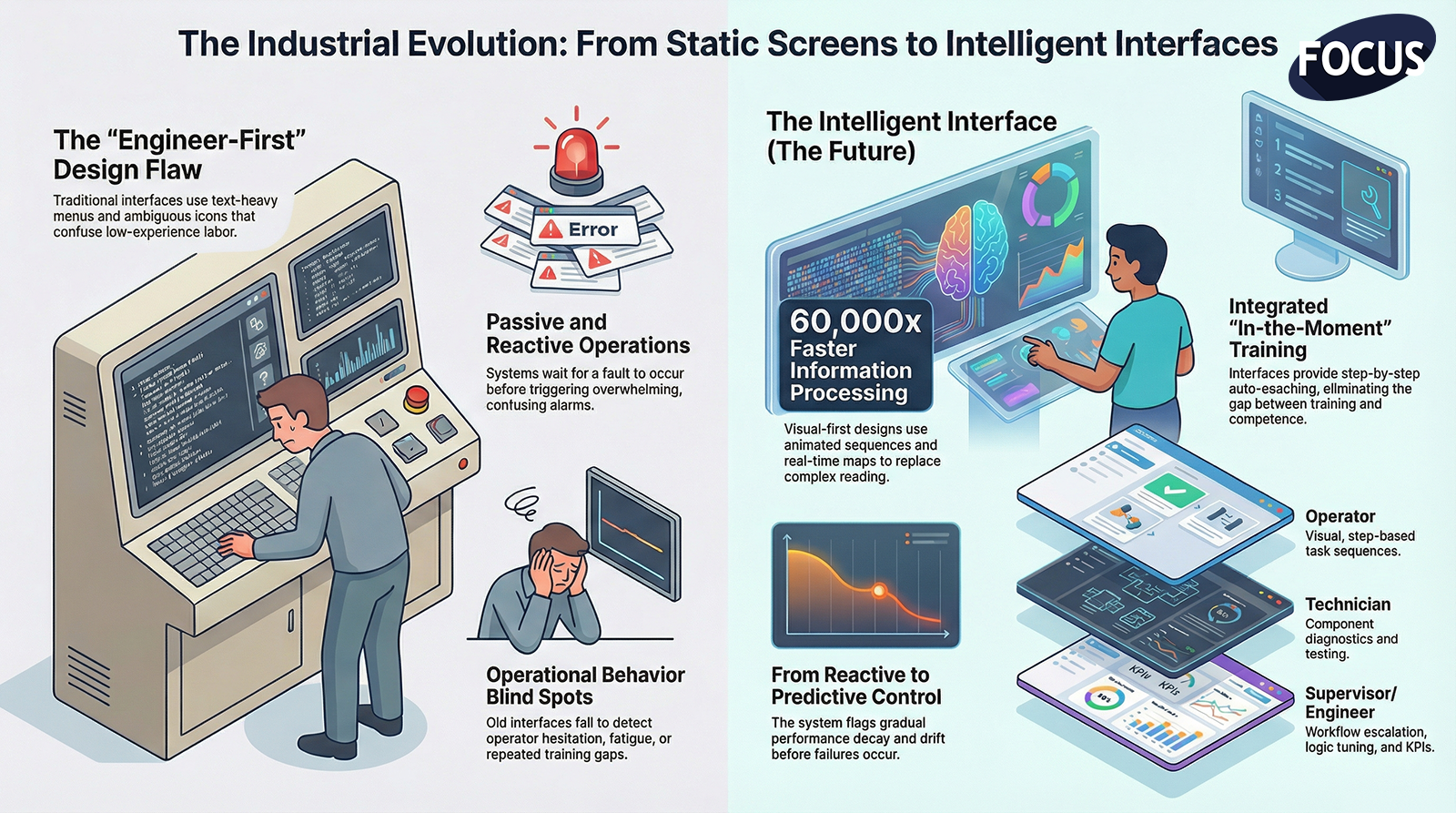
The Future Factory Interface is visual, predictive, layered, guided, and deeply aware of the people using it.
It transforms industrial work from intimidating to intuitive, from reactive to predictive, from confusing to clear.

This episode defines what tomorrow’s interface looks like — and why factories that adopt it will dominate the next decade of manufacturing.

  1. The Old Interface Paradigm Is Breaking Down

Traditional HMIs suffer from:

❌ Text-heavy layouts

❌ Nested menus

❌ Overwhelming alarms

❌ Ambiguous icons

❌ Minimal interactivity

❌ Engineer-first design

❌ Behavior blind spots

❌ Role confusion

These interfaces were never designed for:

  • High turnover
  • Low experience labor
  • Fast automation
  • Predictive technology
  • Multi-machine coordination
  • Visual learning
  • Modern operations

They confuse workers more than they empower them.

The future interface reverses this dynamic completely.

  1. The New Interface Is Visual-First and Text-Minimal

Humans process visual information 60,000× faster than text.

The future HMI uses:

✔ Animated sequences

✔ Real-time machine visualization

✔ Color-coded states

✔ Guided overlays

✔ Component highlighting

✔ Spatial maps

✔ Error illustrations

✔ Touch-based interaction

The user doesn’t need to read the system.
They need to see it.

  1. Intelligent Predictive Interfaces Replace Reactive Screens

Instead of waiting for faults, the future interface:

  • Warns of abnormal drift
  • Predicts failure windows
  • Shows gradual performance decay
  • Flags misalignment patterns
  • Monitors operator hesitation
  • Detects repeated errors
  • Suggests optimal action
  • Recommends improvements

This shifts the factory from reactive to preemptive control.

  1. Multi-Layered Depth Makes Complexity Safe and Simple

The future interface includes:

Operator Layer

Simple, visual, step-based.

Technician Layer

Diagnostics, tests, components.

Engineer Layer

Logic, tuning, configuration.

Supervisor Layer

Workflows, escalation, KPIs.

Everyone gets the interface they need —
not the one-size-fits-none screen of the past.

  1. The Interface Expands Beyond the HMI Screen

Factory interfaces will soon live across:

  • Large displays
  • Tablets
  • Wearable screens
  • Mobile devices
  • Machine towers
  • Digital dashboards
  • AR headsets
  • Multi-station visualization walls

The interface becomes a factory-wide experience, not a 10-inch panel on a steel enclosure.

  1. Direct Human Behavior Feedback Becomes Standard

The future interface understands:

  • Where operators hesitate
  • Which steps confuse them
  • What screens go unused
  • What actions create faults
  • Which instructions fail
  • Training gaps
  • Fatigue patterns
  • Repeated mistakes

This is behavior telemetry, and it enables:

✔ Better UI design

✔ Better workflows

✔ Better training

✔ Better automation

✔ Better safety

The interface starts learning from the people who use it.

  1. Training and Operation Merge Into One System

The future HMI is not a tool —
it is a trainer.

✔ Visual guides

✔ Step sequences

✔ Interactive instructions

✔ Auto-coaching

✔ Skill-level adaptation

✔ In-the-moment training

Operators don’t need to memorize.
The system teaches them as they work.

This eliminates the gap between “trained” and “competent”.

  1. The Interface Becomes the Brainstem of a Connected Factory

The factory interface will integrate:

✔ Robots

✔ Sensors

✔ Quality systems

✔ SCADA

✔ MES

✔ ERP

✔ Maintenance tools

✔ Digital OS layers

✔ Factory displays

Instead of isolated machines, the interface becomes a nervous system connecting every process, every role, and every decision.

  1. Safety Evolves From Passive Warnings to Active Prevention

The future interface doesn’t just show hazards —
it actively prevents unsafe actions.

✔ Guided recovery

✔ Automatic lockouts

✔ Hazard zone visualization

✔ Misuse prevention

✔ Real-time awareness

✔ Operator risk detection

Safety becomes automated, not reactive.

**10. Conclusion:

The Future of the Factory Interface Is Predictive, Visual, Layered, Connected, and Human-Centered**

In the next decade, factories will succeed or fail based on the quality of their interfaces.

The future interface delivers:

✔ Instant clarity

✔ Predictive behavior

✔ Role-based simplicity

✔ Visual guidance

✔ Automated training

✔ Connected intelligence

✔ Real-time telemetry

✔ Faster decision-making

✔ Safer interactions

The best factories won’t have complicated screens.
They’ll have intelligent, adaptive interfaces that empower every worker to succeed — instantly.

This is the next evolution in manufacturing.


FOCUS Integration – Episode 10 – The Future of Factory Interface (Video Notes)

FOCUS Integration – Episode 10 – The Future of Factory Interface (Audio Notes)


Rapid Training

The Rapid Training Evolution:

How Modern HMIs Cut Training Time From Months to Hours**

Executive Summary

The manufacturing workforce has changed forever.

Turnover is higher.
Experience is lower.
Attention spans are shorter.
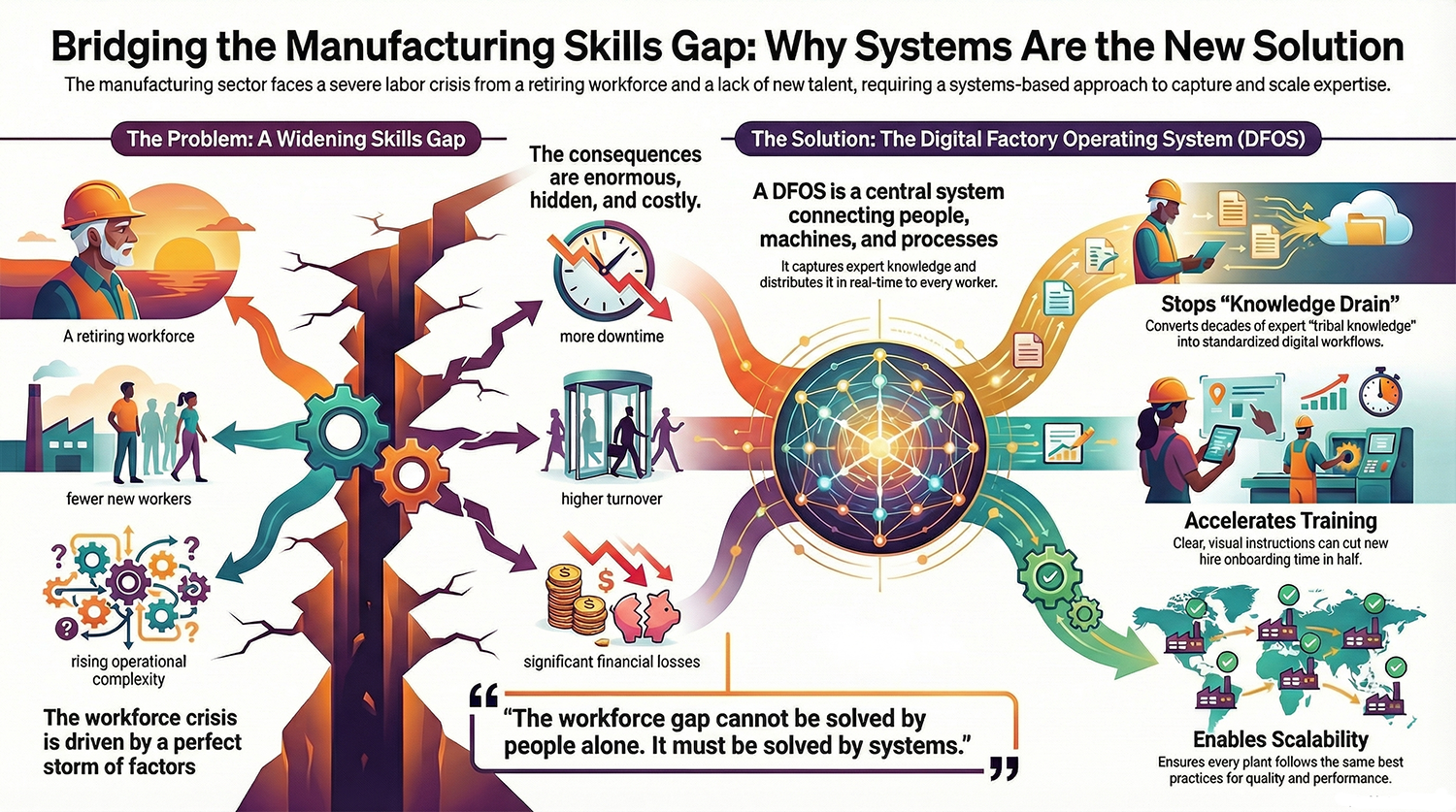
Tribal knowledge is evaporating.
Machines are more complex.
Expectations are increasing.

Factories used to rely on:

  • Shadowing
  • Oral tradition
  • Long apprenticeships
  • Classroom sessions
  • Repetition
  • Veteran mentoring
  • Trial-and-error

That era is gone.

Factories now need workers ready on Day One.
Not after six weeks.
Not after ten cycles of mistakes.
Not after being babysat by a senior operator.

This is the Rapid Training Evolution
a new training model built around modern HMIs that teach as you work, guide every action, eliminate guesswork, and create instant capability.

Training doesn’t happen before the job.
Training happens in the job.

And it evolves as fast as the workforce demands.

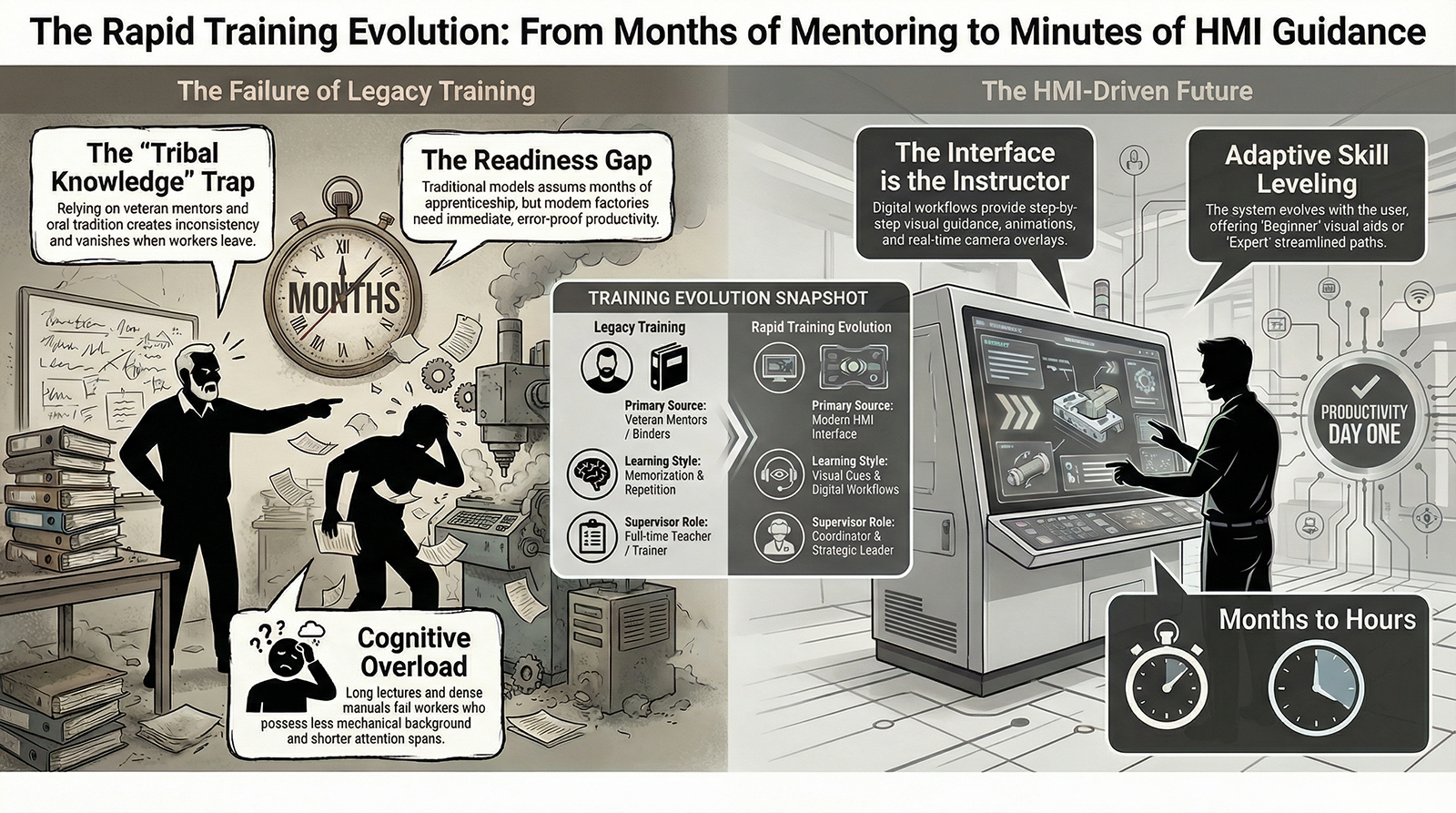
  1. Traditional Training Cannot Keep Up With Modern Manufacturing

Legacy training models assume:

  • Workers stay for years
  • Apprenticeship is normal
  • People learn mechanically through repetition
  • Experienced mentors are always available
  • Workers absorb dense technical information

But the reality is:

❌ Workers come with little mechanical background

❌ New hires have minutes of attention, not days

❌ Turnover wipes out knowledge

❌ Veteran operators are overbooked

❌ Training time destroys production time

❌ Complexity grows faster than capability

Factories need training that adapts to the worker — not the other way around.

  1. The Rapid Training Evolution Delivers Skill Through the HMI Itself

Modern HMIs must do more than display information.

They must:

✔ Teach

✔ Guide

✔ Explain

✔ Confirm

✔ Warn

✔ Correct

✔ Sequence

✔ Coach

✔ Support

The HMI becomes the primary trainer.

Not a supervisor.
Not a binder.
Not a tribal expert.
Not a classroom.

The interface becomes the instructor.

This is the future.

  1. Training Becomes Visual, Not Verbal

Traditional training requires:

  • Listening
  • Memorizing
  • Note-taking
  • Remembering steps
  • Interpreting explanations
  • Asking clarifying questions

Modern workers struggle with this.

The Rapid Training Evolution replaces lectures with visuals:

✔ Animations

✔ Photos of correct orientation

✔ Videos of each step

✔ Highlighted components

✔ Before/after visuals

✔ Quality comparison images

✔ Real-time camera overlays

Humans don’t learn best from words.
They learn best from seeing.

  1. Step-by-Step Guided Workflows Become Digital Training

Instead of teaching a changeover once and hoping it sticks, the HMI:

✔ Guides the user

✔ Locks sequence

✔ Shows visual confirmation

✔ Blocks dangerous actions

✔ Removes unnecessary steps

✔ Times progress

✔ Confirms completion

✔ Tracks common mistakes

This turns the changeover from a “tribal event” into a repeatable, error-proofed training sequence.

Workers learn the correct way — and only the correct way.

  1. Training Evolves in Real Time as Users Interact With the System

The system adapts to the user:

Beginner Mode

  • More visuals
  • Slower pacing
  • More confirmations
  • More training tips

Intermediate Mode

  • Faster navigation
  • Condensed steps
  • Fewer prompts

Expert Mode

  • Quick access
  • Streamlined paths
  • Advanced troubleshooting tools

Training evolves as the worker evolves.

  1. The Rapid Training Evolution Eliminates the Dependency on Tribal Knowledge

Factories used to rely on:

“Ask Bill, he knows the trick.”
“Only Maria knows how to fix that jam.”
“You’ll learn it when you see it happen.”
“That’s just how we’ve always done it.”

This destroys consistency.

Modern HMIs:

  • Capture expert knowledge
  • Convert it into digital workflows
  • Deliver it at the exact moment it’s needed
  • Make every operator capable
  • Preserve knowledge permanently

Tribal knowledge becomes digital knowledge.

  1. The Rapid Training Evolution Accelerates Maintenance Capability

Maintenance used to take:

  • Years of experience
  • Tribal onboarding
  • Deep mechanical familiarity
  • Pattern recognition
  • Trial-and-error under pressure

Now the HMI provides:

✔ Fault explanation

✔ Likely causes

✔ Visual component maps

✔ Step-by-step repair sequences

✔ Predictive warnings

✔ Required tools checklists

✔ Verification steps

Maintenance techs become productive dramatically faster.

  1. Supervisors Shift From Trainers to Coordinators

Traditional supervisors spend:

  • 30% of their time training
  • 40% correcting mistakes
  • 20% troubleshooting
  • 10% actually supervising
  • 0% improving anything

With modern HMIs:

✔ The HMI trains

✔ The HMI guides

✔ The HMI enforces sequence

✔ The HMI documents performance

✔ The HMI flags skill gaps

Supervisors stop being teachers —
they become leaders.

  1. The Rapid Training Evolution Reduces Turnover

Workers leave because:

  • They feel confused
  • They feel overwhelmed
  • They feel unsupported
  • They feel like they are failing
  • They feel unsafe
  • They don’t understand the job

The new HMI experience:

✔ Builds confidence

✔ Reduces stress

✔ Creates clarity

✔ Makes success obvious

✔ Gives instant feedback

✔ Makes the job easier

Confidence is retention.
Clarity is retention.
Guidance is retention.

**10. Conclusion:

The Rapid Training Evolution Is Not Optional — It Is Survival**

Factories cannot rely on:

  • Classroom learning
  • Long apprenticeship
  • Veteran mentoring
  • Mechanical intuition
  • Memorized steps
  • Trial-and-error
  • Old HMIs
  • Tribal expertise

The modern workforce requires:

✔ Immediate capability

✔ Visual instruction

✔ Step-by-step workflows

✔ Predictive guidance

✔ Skill-on-demand

✔ Training built into the interface

This is the Rapid Training Evolution.

Training is no longer something workers receive.

Training is something the system provides — continuously, visually, and intelligently.

This is how factories will thrive in the next decade.

FOCUS Integration – Episode 9 – The Rapid Training Revolution (Video Notes)
https://youtu.be/sOKgXNQICDE

FOCUS Integration – Episode 9 – The Rapid Training Revolution (Audio Notes)

The Next Generation Workforce Built for Speed, Clarity, Technology, and Intelligent Automation**

Executive Summary

Manufacturing has entered a new era —
one where automation is smarter, faster, and more accessible than ever before.

But the biggest shift is not the machines.

It’s the people.

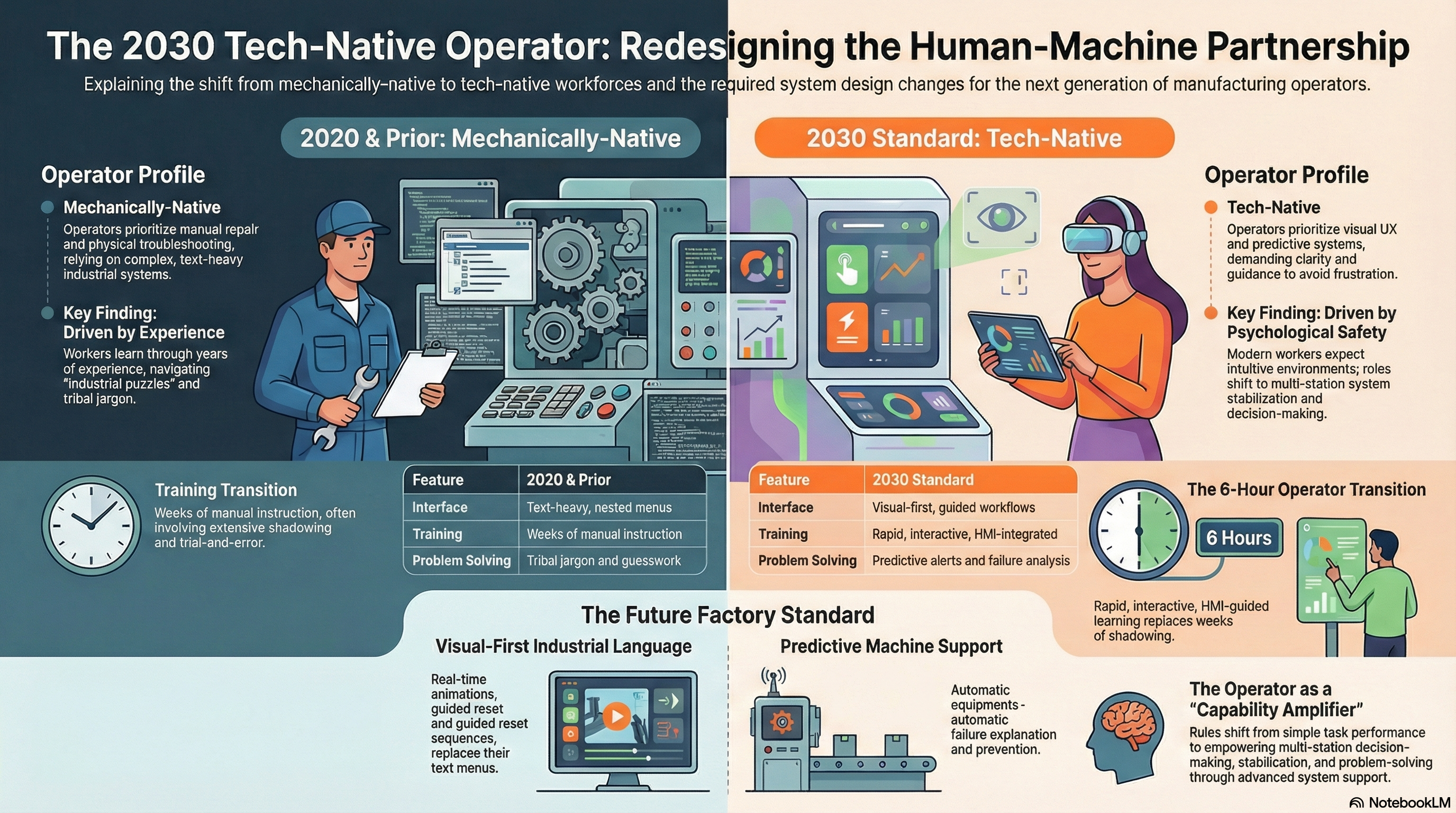
The operator of 2030 is not the operator of 2020, 2010, or 1990.

They are:

  • More tech-native
  • More visual
  • More adaptable
  • Less mechanically trained
  • Less patient with complexity
  • More comfortable with automation
  • More dependent on clear guidance
  • More motivated by impact and confidence
  • Less tolerant of confusing systems
  • More capable inside the right environment

The factories that understand who the 2030 operator is —
and design their systems around them —
will lead the next industrial decade.

  1. The 2030 Operator Is Tech-Native, Not Mechanically-Native

The workforce entering manufacturing in 2030 grew up with:

  • Smartphones
  • Touchscreens
  • Instant information
  • Visual UX
  • Predictive systems
  • Guided interfaces
  • Automation everywhere

But they did not grow up with:

  • Mechanical repair
  • Industrial wiring
  • Manual machinery
  • Physical troubleshooting
  • Complex industrial HMIs

Factories must evolve their interfaces to match the way the new workforce thinks and learns.

This is why visual-first design becomes the dominant industrial language.

  1. The 2030 Operator Needs Clarity, Not Complexity

The new workforce is overwhelmed by:

❌ Text-heavy HMIs

❌ Nested menus

❌ Ambiguous alarms

❌ Tribal jargon

❌ Guesswork-based troubleshooting

They thrive with:

✔ Visual cues

✔ Guided steps

✔ Clear workflows

✔ Real-time animation

✔ Predictive warnings

✔ Step-by-step reset sequences

The Operator of 2030 expects intuitive interfaces, not industrial puzzles.

  1. The 2030 Operator Will Learn Faster Than Any Workforce Before — When Trained Correctly

By 2030, training that takes weeks will be unacceptable.

Training must be:

  • Rapid
  • Visual
  • Interactive
  • In the flow of work
  • Guided at the HMI
  • Reinforced through telemetry
  • Supported by automatic correction
  • Separated by role

This is why the 6-hour operator transition becomes the new normal.

2030 operators don’t need more training time.
They need better training architecture.

  1. The 2030 Operator Expects Predictive Support From the Machine

They grew up with:

  • Google autofill
  • GPS rerouting
  • Smart notifications
  • Predictive text
  • Automatic error correction
  • AI-driven recommendations

So they expect the same from industrial equipment.

They assume machines will:

✔ Warn them early

✔ Guide them clearly

✔ Prevent them from making mistakes

✔ Show them the correct reset path

✔ Explain what went wrong

✔ Help them succeed

And when machines don’t behave this way, they lose trust in the system.

  1. The 2030 Operator Will Thrive in a Unified Factory Ecosystem

Because:

  • Interfaces match
  • Workflows match
  • Alarms match
  • Escalation paths match
  • Visual rules match
  • Training structure matches

The Operator of 2030 becomes cross-functional, not machine-dependent.

Factories achieve:

✔ Flexible staffing

✔ Faster shift changes

✔ Lower downtime

✔ Lower turnover

✔ Faster response times

✔ Stronger engagement

Unified factories don’t just help processes —
they help people.

  1. The 2030 Operator Will Rely Heavily on Smart Escalation

Instead of:

  • Guessing
  • Asking around
  • Waiting for maintenance
  • Hoping for answers

2030 operators use:

✔ Clear escalation workflows

✔ Visual error insights

✔ Priority-based alerts

✔ Automated notifications

✔ Guided failure analysis

✔ Technician-layer handoff

This makes them:

  • Proactive
  • Confident
  • Effective
  • Independent

And it makes supervisors far more capable.

  1. The 2030 Operator Will Expect Real-Time Feedback on Performance

They grew up in a world of:

  • Metrics
  • Scores
  • Streaks
  • Instant feedback systems
  • Gamified learning

Factories that provide real-time feedback unlock:

  • Better engagement
  • Faster learning
  • Safer behavior
  • Clear goals
  • Higher performance

Telemetry becomes not just a tool —
but a motivational engine.

  1. The 2030 Operator Will Demand Psychological Safety

Psychological safety is the invisible requirement of modern work.

Operators of 2030 will not tolerate:

❌ Confusion

❌ Blame

❌ Unsafe systems

❌ Overly complex tasks

❌ Poorly designed HMIs

They expect:

✔ Guidance

✔ Support

✔ Clarity

✔ Predictability

✔ Confidence

Factories built for the 2030 operator will have far lower turnover and far higher skill progression.

  1. The Operator of 2030 Will Become a High-Value Asset — Not a Task Performer

With clearer systems, better interfaces, and predictive automation, the operator becomes:

  • A decision-maker
  • A system ambassador
  • A process stabilizer
  • A multi-station specialist
  • A capability amplifier

Their role shifts from:

“Run the machine”
to
“Elevate the system.”

This is the true evolution of the human-machine partnership.

**10. Conclusion:

The Operator of 2030 Is the Reason the Unified Factory Exists**

Everything we have covered — speed, training, clarity, plug-and-play, unified HMIs, predictive support — exists for one purpose:

To empower the next generation of operators to succeed instantly.

The Operator of 2030 is:

✔ Faster to train

✔ Easier to support

✔ More adaptable

✔ More capable

✔ More confident

✔ More engaged

✔ More aligned with automation

Factories that design for this new workforce will dominate the next decade.

Factories that don’t will fall behind quickly.

The future of manufacturing is not machines replacing people.

It is better machines enabling better people.


FOCUS Integration – Episode 7 – Operators of 2030 (Video Notes)


FOCUS Integration – Episode 8 – Operators of 2030 (Audio Notes)

https://youtu.be/OLmBzKVxeUA

The HMI as a Digital Coach:

How Modern Interfaces Will Train Workers Automatically On the Line**

Executive Summary

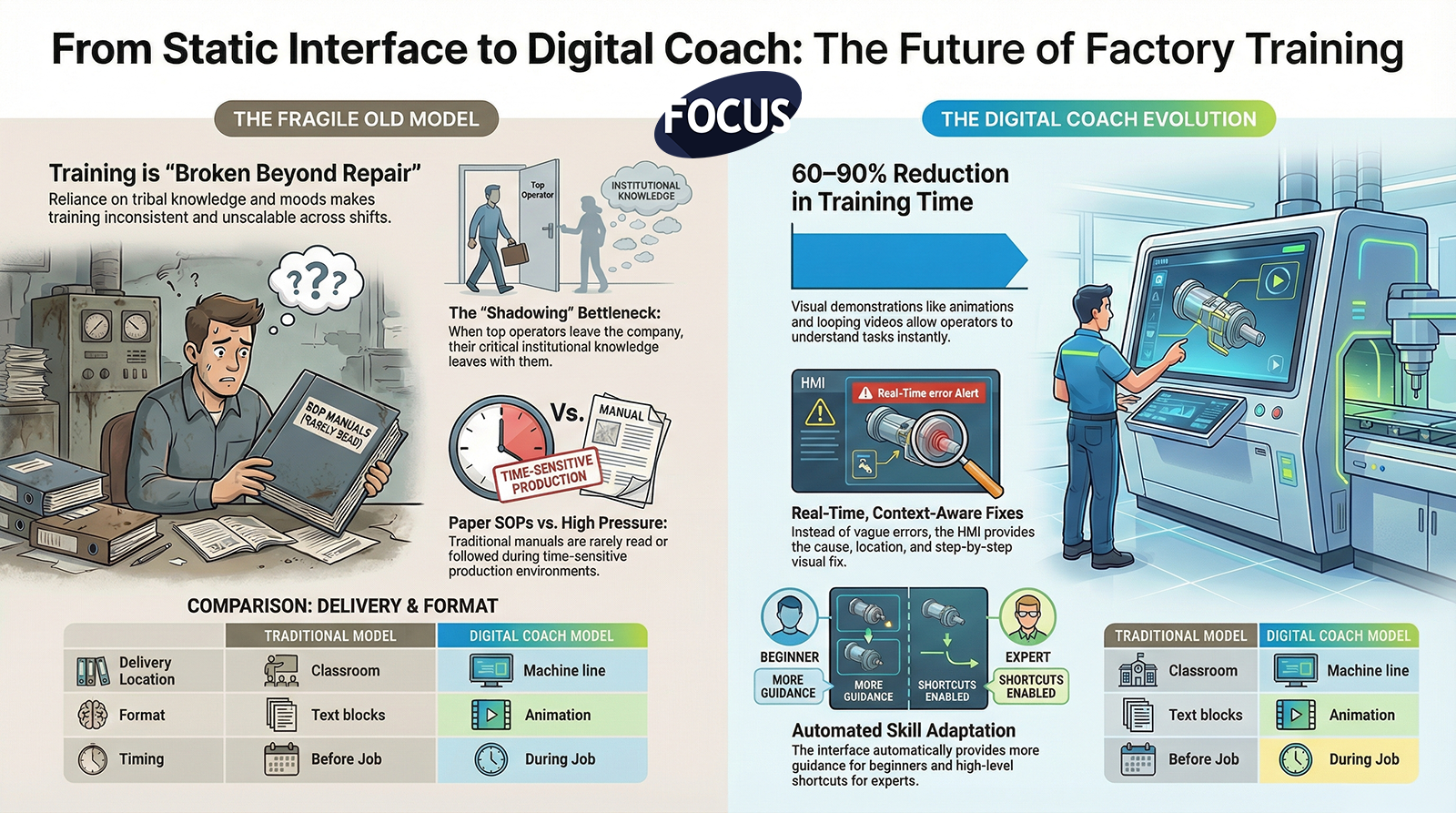
For decades, factories have relied on three fragile systems of training:

  1. Shadowing — which is inconsistent
  2. Tribal knowledge — which is unreliable
  3. Paper SOPs — which nobody reads under pressure

The result?

  • Operators feel unprepared
  • Supervisors feel frustrated
  • Maintenance feels overwhelmed
  • Quality feels unsupported
  • Engineers feel misunderstood
  • Management feels defeated

Training has always been a bottleneck in manufacturing.

But that bottleneck disappears the moment the HMI evolves from a static interface into a dynamic digital coach capable of training workers automatically, continuously, and precisely at the moment instruction is needed.

This is the future of manufacturing skill development.

  1. The Old Training Model Is Broken Beyond Repair

Traditional operator training depends on:

  • The trainer’s personality
  • The trainer’s memory
  • The trainer’s mood
  • The trainer’s availability
  • The trainer’s experience
  • And whether the trainee was paying attention that day

This creates massive inconsistencies:

  • Two operators trained on the same machine perform differently
  • Shifts disagree on how things should be done
  • Quality issues appear randomly
  • Maintenance receives vague problem descriptions
  • Safety behaviors vary
  • Supervisors rely on assumptions

Worst of all — when top operators leave, their knowledge leaves with them.

The old model cannot scale.

The digital coach can.

  1. The Digital Coach Lives Inside the HMI

In the next-generation factory, training no longer happens:

  • In classrooms
  • In meetings
  • In binders
  • In notebooks
  • In tribal memory

It happens on the line, through the HMI, during real work.

A digital coach:

  • Shows the operator what to do
  • Demonstrates how to do it
  • Explains why it matters
  • Alerts when something is done incorrectly
  • Corrects the behavior instantly
  • Reinforces good habits
  • Logs training progress
  • Tracks skill competency

This means the HMI doesn’t just control the machine—it develops the worker.

  1. Training Becomes Embedded Into the Job, Not External to It

Traditional training happens before the job.
Digital coaching happens during the job.

This solves multiple issues:

✔ Operators no longer forget steps

✔ Training starts immediately upon hiring

✔ Skill gaps disappear in real time

✔ Operators learn in the exact context the action is needed

✔ Work becomes protected from mistakes

✔ Training is standardized across all shifts

No more:

  • “Well Bob taught me to do it this way.”
  • “I didn’t know that step mattered.”
  • “That’s not how I was trained.”

The HMI becomes the single source of truth.

  1. The Digital Coach Uses Visual Demonstrations, Not Text Blocks

People learn faster through visuals.

The digital coach provides:

  • Animations
  • Short looping videos
  • Photos of real machine components
  • Step illustrations
  • Directional arrows
  • “What good looks like” images
  • Exploded views
  • Before/after comparisons

Operators understand instantly.

This reduces training time by 60–90%.

  1. The Digital Coach Explains Every Alarm and Guides Every Fix

When something goes wrong, the digital coach doesn’t just throw an error on the screen.

It provides:

  1. The cause of the error
  2. The location of the issue
  3. A visual of the component
  4. The step-by-step fix
  5. A check to confirm correction
  6. Suggestions for prevention

This is real-time, context-aware training.

Every alarm becomes a learning moment, not a frustration.

  1. The Digital Coach Adjusts to Operator Skill Level

Beginner operators see:

  • More guidance
  • More steps
  • More visuals
  • Slower pacing
  • Context explanations

Experienced operators see:

  • Shortcut workflows
  • Higher-level options
  • Less hand-holding
  • Advanced troubleshooting

Skill development becomes automated.

  1. The Digital Coach Reinforces Correct Behavior Through Feedback

The HMI acknowledges and builds habits:

  • “Great job — sensor cleared.”
  • “Correct placement detected.”
  • “Verification complete.”
  • “Step executed perfectly.”

Positive reinforcement is one of the most powerful training accelerators.

Small wins build confidence.
Confidence builds independent capability.
Capability builds retention.

  1. The Digital Coach Tracks Competency Automatically

Behind the scenes, the HMI collects data on:

  • Tasks completed
  • Mistakes corrected
  • Steps skipped
  • Time per action
  • Alarm responses
  • Troubleshooting paths taken
  • Required resets
  • Safety confirmations

This data supports:

  • Certification
  • Performance development
  • Supervisor insight
  • Training optimization
  • Career progression

Skill becomes measurable.

And once it’s measurable, it’s manageable.

  1. The Digital Coach Ensures Every Shift Operates Identically

One of the biggest problems in manufacturing is shift-to-shift inconsistency.

The digital coach eliminates this by:

  • Standardizing workflows
  • Enforcing sequence
  • Embedding verification
  • Preventing unauthorized shortcuts
  • Making tribal knowledge irrelevant

Every shift works the same way.
Every operator follows the same steps.
Every machine is run correctly.

Consistency becomes automatic.

**10. Conclusion:

The HMI of the Future Doesn’t Just Display Information — It Teaches.**

Factories used to say:

  • “We can’t find skilled people.”
  • “We don’t have time to train.”
  • “We lose too much knowledge when people leave.”
  • “Operators make too many mistakes.”
  • “Training doesn’t stick.”
  • “Every shift does things differently.”

The Digital Coach solves all of it.

Because the future of manufacturing belongs to the systems that:

  • Teach automatically
  • Guide precisely
  • Correct instantly
  • Reduce cognitive load
  • Build confidence
  • Protect quality
  • Speed up training
  • Eliminate guesswork

This isn’t just a new HMI.

This is a new model for how humans learn and perform inside a factory.

It changes everything.

FOCUS Integration – Episode 7 – The HMI as a Digital Coach (Video Notes)


FOCUS Integration – Episode 7 – The HMI as a Digital Coach (Audio Notes)


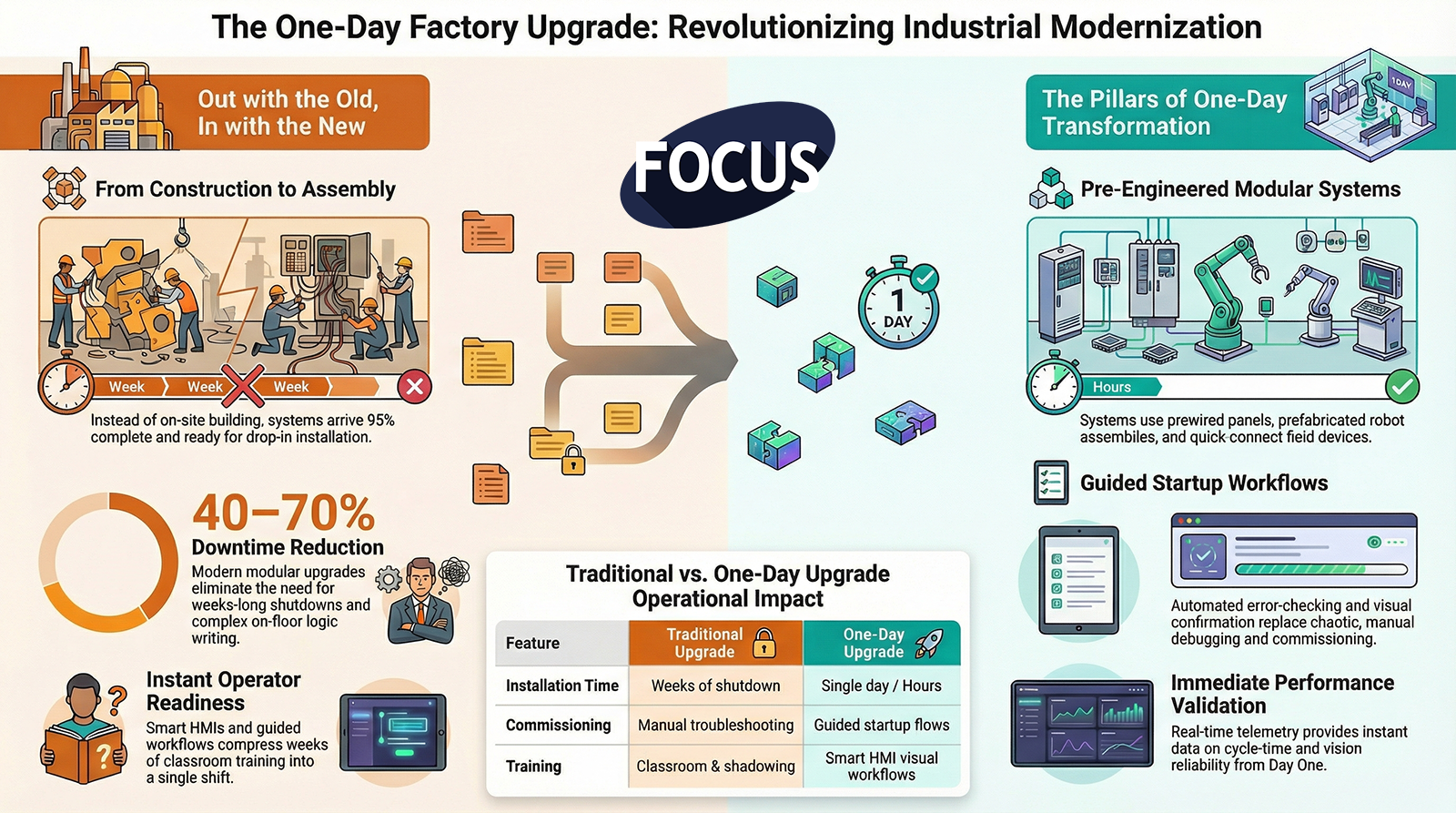
One-Day Factory Upgrade:

How Modern Automation, Smart Interfaces, and Prebuilt Systems Enable Rapid Transformation**

Executive Summary

Factories used to think upgrades required:

  • Weeks of shutdown
  • Dozens of contractors
  • Complex wiring
  • Slow debugging
  • Endless paperwork
  • Painful retraining
  • Full workflow redesign

That era is gone.

The modern manufacturing world demands upgrades that happen in hours — not weeks.

The One-Day Factory Upgrade is not science fiction.
It is the natural result of:

  • Modular automation
  • Prevalidated logic
  • Plug-and-play electrical design
  • Standardized mechanical interfaces
  • Smart HMIs
  • Guided startup workflows
  • Factory-wide visualization
  • Real-time telemetry

This episode explains how a factory can transform fast, safely, and without shutting down for days.

  1. Traditional Factory Upgrades Are Too Slow for Modern Manufacturing

Legacy upgrade models involve:

  • Long installation windows
  • Manual rework
  • Tribal commissioning
  • Slow troubleshooting
  • Inconsistent knowledge transfer
  • Complicated changeovers
  • Overwhelming training demands

These delays destroy:

  • Throughput
  • Labor availability
  • Production schedules
  • On-time delivery
  • Customer confidence
  • Profit margins

The One-Day Factory Upgrade eliminates this entirely.

  1. The One-Day Upgrade Is Made Possible by Pre-Engineered, Modular Systems

The secret is NOT working faster.
The secret is redesigning automation so it doesn’t require long installations at all.

Modern upgrade-ready systems include:

✔ Prewired panels

✔ Prefabricated robot assemblies

✔ Pretested safety circuits

✔ Modular conveyors

✔ Prebuilt pneumatic packages

✔ Standardized I/O blocks

✔ Quick-connect field devices

✔ Drop-in robot programs

✔ Universal mounting points

Instead of building on-site, the factory receives a system that is 95% complete before it arrives.

Installation becomes assembly, not construction.

  1. Guided Startup Workflows Replace the Painful Commissioning Process

Commissioning used to take days because:

  • Technicians weren’t aligned
  • Logic had to be tuned
  • Operators didn’t understand the system
  • Faults weren’t predictable
  • Manuals were unclear
  • Training was nonexistent
  • Debugging was chaotic

The One-Day Upgrade uses:

✔ Step-by-step startup flows

✔ Visual confirmation checks

✔ Auto-detection of sensors and devices

✔ Preconfigured motion profiles

✔ Automated error-checking

✔ Standardized commissioning sequences

Debug is finished before the system even arrives.

Startup becomes a guided process —
not a stressful marathon.

  1. Smart HMIs Compress Weeks of Training Into a Single Shift

Operators normally need:

  • Classroom sessions
  • Job shadowing
  • Tribal walkthroughs
  • Hands-on repetition
  • Multiple mistakes
  • Confidence building

Smart HMIs eliminate all of that.

The One-Day Upgrade includes HMIs with:

✔ Visual workflows

✔ Guided operation

✔ Animated changeover steps

✔ Standard recovery sequences

✔ Predictive fault insights

✔ Role-based layers

✔ Real-time clarity

This makes even complex automation approachable for new workers the moment it lands on the floor.

  1. Telemetry Confirms the Upgrade Works Immediately

In a traditional upgrade, engineers wait:
“Does it actually perform?
Is the cycle stable?
Are sensors reliable?
Is the robot tuned?”

Telemetry answers those questions instantly:

✔ Cycle-time readiness

✔ Component health

✔ Alarm clustering

✔ Load monitoring

✔ Vision reliability

✔ Operator interaction data

✔ Predictive signals

The system doesn’t need weeks to prove itself —
it demonstrates stability on Day One.

  1. The One-Day Factory Upgrade Minimizes Disruption and Maximizes Productivity

Old upgrade model:

❌ Shut down for days

❌ Move machines

❌ Rewire everything

❌ Rebuild infrastructure

❌ Write logic on the floor

❌ Stress the workforce

❌ Train while running

The One-Day Upgrade:

✔ Drop-in installation

✔ Minimal downtime

✔ Predictive startup

✔ Guided workflows

✔ Real-time validation

✔ Instant operator readiness

✔ Seamless integration

The line doesn’t stop for a week.
It pauses for a moment —
then becomes better than before.

  1. Why the One-Day Upgrade Is Not Optional — It’s the Future Standard

Manufacturers now face:

  • Unpredictable demand
  • Rapid production shifts
  • Frequent product changes
  • Labor scarcity
  • Tight customer deadlines
  • Increased automation dependency

They no longer have the luxury of long shutdowns.

The future factory requires systems that are:

✔ Fast to install

✔ Fast to start

✔ Fast to teach

✔ Fast to adjust

✔ Fast to maintain

✔ Fast to grow

The One-Day Upgrade is the only model that fits this reality.

  1. The One-Day Upgrade Supports the Entire Modern Factory Philosophy

This concept ties directly to:

  • Visual Factory 3.0
  • Cognitive Load Reduction
  • Rapid Training Evolution
  • Multi-layered interfaces
  • HMI telemetry
  • Predictive interaction
  • Factory-wide digital OS
  • Automation Without Confusion

Everything works because every part of the system is aligned around simplicity, clarity, and speed.

  1. Case Studies Already Prove the Model Works

Factories that have adopted the one-day upgrade model report:

✔ Immediate throughput increases

✔ Same-day training success

✔ Faster shift transitions

✔ 40–70% downtime reduction

✔ Drastically fewer mistakes

✔ Higher operator confidence

✔ Lower turnover

✔ Predictable maintenance

Results that used to take months now happen in one shift.

**10. Conclusion:

The Future of Manufacturing Will Be Upgraded in a Single Day**

Factories can no longer afford slow modernization.

They need speed.
They need clarity.
They need predictability.
They need guided workflows.
They need visual systems.
They need better HMIs.
They need smarter automation.
They need tech that can be installed, learned, and trusted instantly.

The One-Day Factory Upgrade is the new standard.

Not someday.
Today.


FOCUS Integration – Episode 6 – The One-Day Factory Upgrade (Video Notes)

FOCUS Integration – Episode 5 – Cognitive Load Crisis (Audio Notes)

Cognitive Load Crisis

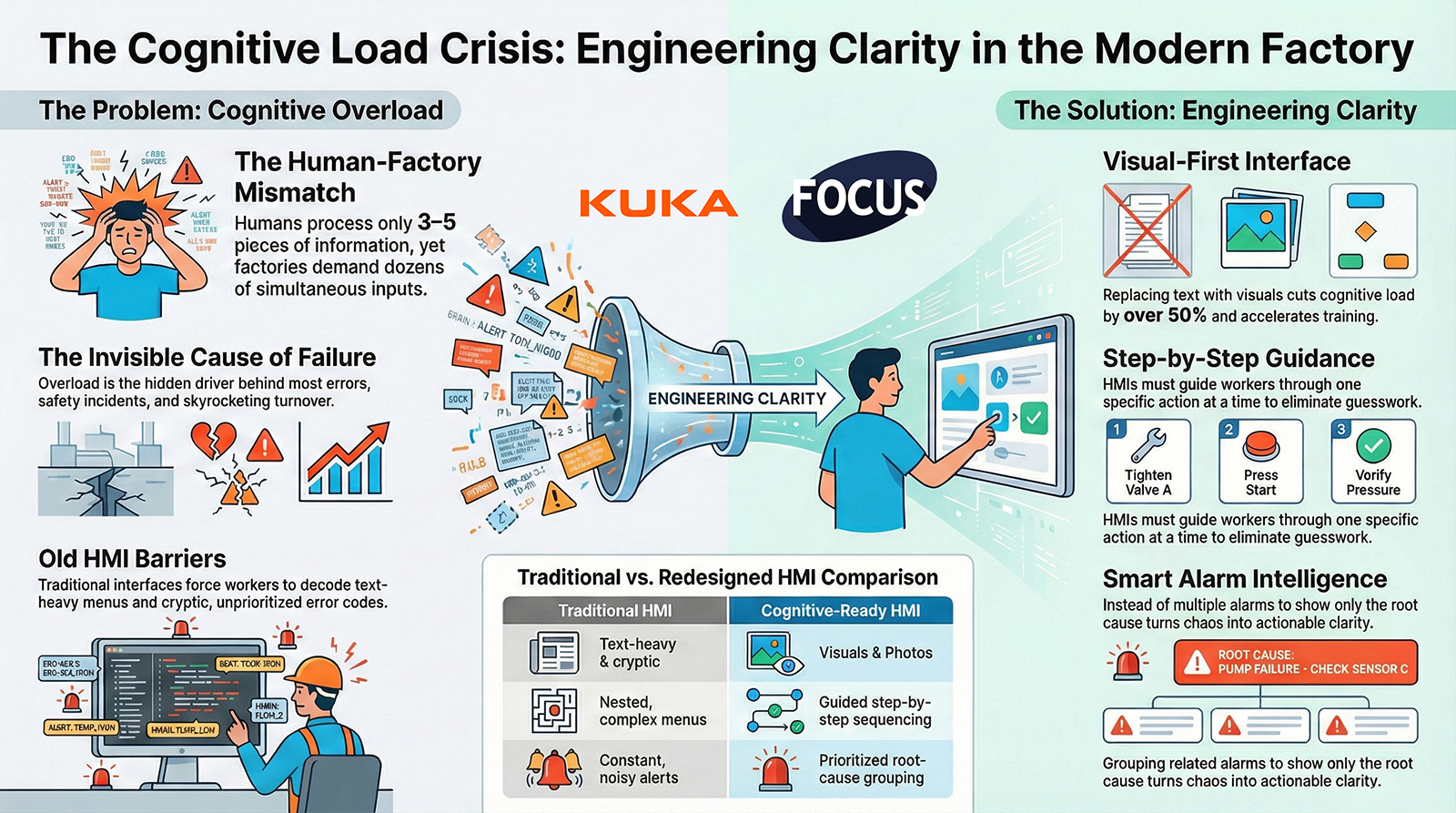
The Cognitive Load Crisis:

Why Modern Factories Are Overwhelming Workers (and How HMIs Must Fix It)**

Executive Summary

The modern factory has evolved faster than the human mind’s ability to keep up.

Automation has accelerated.
Production has intensified.
Complexity has multiplied.
Turnover has skyrocketed.

But human cognitive limits have not changed.

Operators, technicians, and supervisors are drowning in:

  • Alarms
  • Data
  • Steps
  • Screens
  • Instructions
  • Decisions
  • Distractions
  • Variability
  • Pressure

This overload creates errors, slows production, causes safety incidents, increases scrap, and drives people out of the industry.

This is not a performance problem.
This is not a training problem.
This is not a motivation problem.

This is a cognitive load problem — and modern HMIs must be redesigned to solve it.

  1. Humans Have Cognitive Limits — Factories Act Like They Don’t

The human brain can only process:

  • 3–5 pieces of new information at one time
  • Simple sequences
  • Clear visuals
  • Low ambiguity
  • Tasks with immediate feedback

But factories expect workers to juggle:

✔ Dozens of screens

✔ Multiple simultaneous alarms

✔ Complex mechanical understanding

✔ Tribal instructions

✔ Machine timing

✔ Quality expectations

✔ Safety rules

✔ Changeover steps

✔ Downtime pressure

The mismatch between expectation and ability is the root of modern operational chaos.

  1. Cognitive Overload Causes Most Factory Problems

When workers are mentally overwhelmed, they:

❌ Make mistakes

❌ Forget steps

❌ Miss cues

❌ React slowly

❌ Skip instructions

❌ Trigger faults

❌ Misinterpret alarms

❌ Perform unsafe actions

❌ Lose confidence

❌ Quit

Cognitive overload is not visible —
it’s not like a broken machine or a red alarm light —
but it is the invisible force behind most operational instability.

  1. Old HMIs Make Cognitive Load Worse

Traditional HMIs were built for engineers:

  • Tiny buttons
  • Text-heavy screens
  • Nested menus
  • Cryptic errors
  • Parameter overload
  • No visual hierarchy
  • No prioritization
  • No sequencing
  • No simplification

These interfaces increase cognitive load by forcing workers to interpret, decode, remember, and guess.

This is unacceptable in the modern factory.

  1. The Cognitive Load Crisis Hits New Workers the Hardest

New workers:

  • Have no tribal knowledge
  • Are less mechanically familiar
  • Need visual learning
  • Are overwhelmed by too much text
  • Lose confidence quickly
  • Leave if the job feels chaotic

If a new worker is overloaded in the first hour,
they will not survive the first week.

The HMI must make the factory understandable to the inexperienced instantly.

  1. Cognitive Load Must Be Engineered Down at the Interface Level

The only scalable solution is to redesign HMIs to:

✔ Reduce information quantity

✔ Prioritize essential tasks

✔ Show only what matters now

✔ Use visuals instead of text

✔ Guide step-by-step

✔ Predict what the user needs

✔ Block incorrect actions

✔ Minimize decision-making

✔ Highlight the critical path

✔ Reduce noise from alarms

This is how you engineer clarity.

This is how you reduce cognitive demand.

  1. The HMI Must Tell Workers EXACTLY What to Do — One Step at a Time

Cognitive load drops dramatically when workers are not asked to:

  • Remember sequences
  • Interpret ambiguous instructions
  • Decode technical jargon
  • Navigate unfamiliar screens
  • Make high-risk decisions under pressure

A modern HMI should guide:

✔ Step 1 → do this

✔ Step 2 → now this

✔ Step 3 → verify

✔ Step 4 → confirm

Nothing more.
Nothing less.
Nothing confusing.

This transforms performance.

  1. Visual-First Design Cuts Cognitive Load by Over 50%

When you replace text with visuals:

  • Recognition replaces interpretation
  • Processing is instant
  • Error rates drop
  • Training accelerates
  • Stress levels fall
  • Memory burden disappears

Examples:

  • Green check / red X visuals
  • Animated steps
  • Photos of correct positions
  • Side-by-side quality comparisons
  • Highlighted sensor locations
  • Visual zone maps

Humans are visual.
HMIs must reflect that.

  1. Smarter Alarm Systems Reduce Cognitive Load During Chaos

Alarms overwhelm workers:

  • Too many
  • Too cryptic
  • Too technical
  • Too frequent
  • Too urgent
  • Too unclear

Modern alarm intelligence:

✔ Groups related alarms

✔ Prioritizes the root cause

✔ Hides nuisance alarms

✔ Shows only the actionable step

✔ Provides a visual recovery guide

This turns alarm storms into clarity storms.

  1. Reducing Cognitive Load Increases Speed, Quality, and Safety

When cognitive load is low:

✔ Operators move faster

✔ Recovery times shrink

✔ Mistakes disappear

✔ Safety improves

✔ Training becomes easy

✔ Turnover drops

✔ Consistency rises

✔ Confidence skyrockets

Humans perform at their best when the system supports them instead of overwhelming them.

**10. Conclusion:

Solving the Cognitive Load Crisis Is the Key to the Modern Factory**

Factories don’t fail because people are bad at their jobs.
Factories fail because systems overwhelm people.

The Cognitive Load Crisis is the invisible barrier stopping:

  • Training effectiveness
  • Standard work
  • Safety culture
  • Quality performance
  • Operational speed
  • Employee retention
  • Automation readiness

Modern HMIs can fix this by:

✔ Simplifying

✔ Visualizing

✔ Prioritizing

✔ Sequencing

✔ Predicting

✔ Guiding

✔ Supporting

This is not a UX upgrade.
This is a workforce revolution.

Reducing cognitive load is how factories survive the next decade.


FOCUS Integration – Episode 5 – Cognitive Load Crisis (Video Notes)


FOCUS Integration – Episode 5 – Cognitive Load Crisis (Audio Notes)


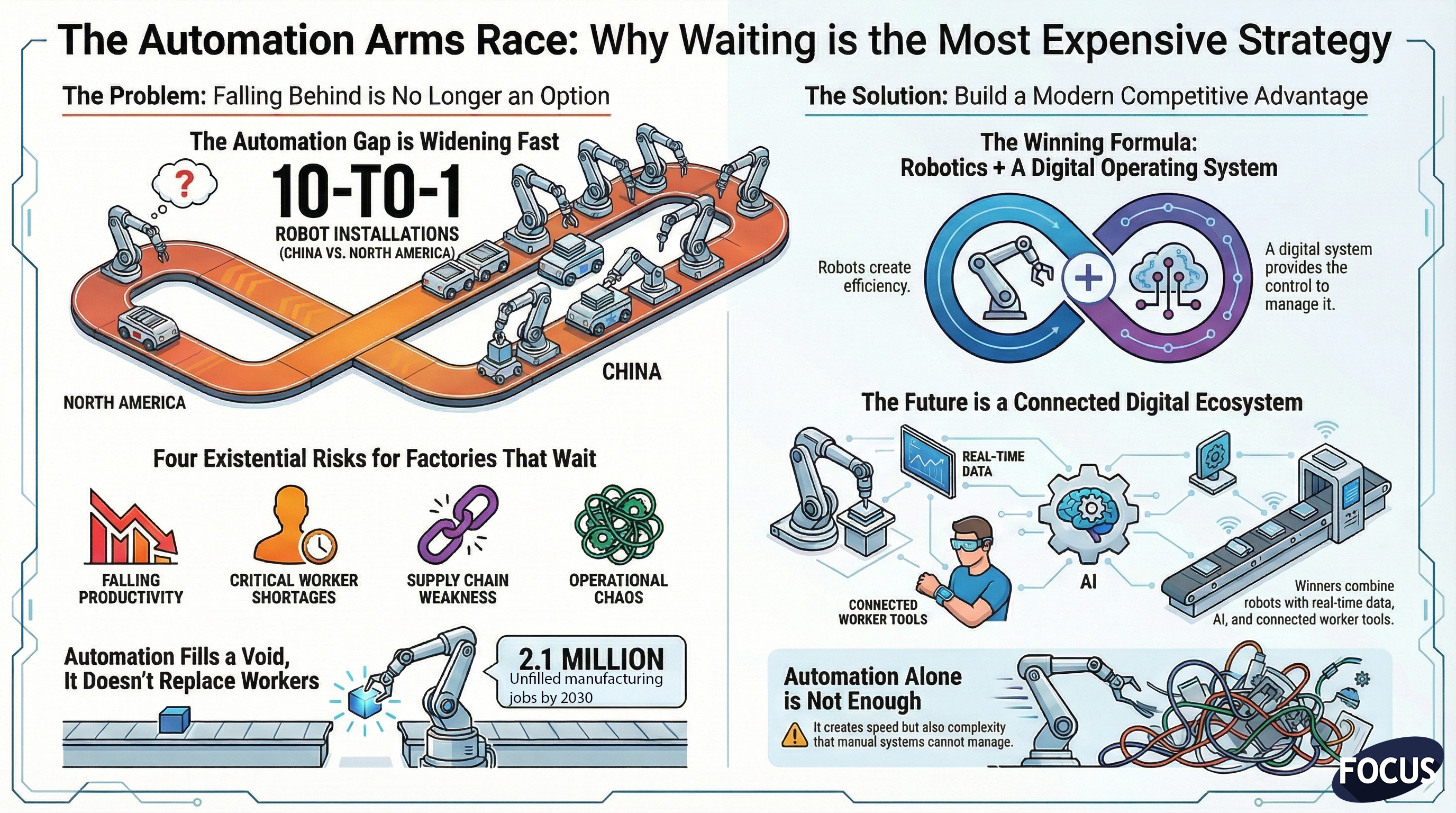
The Global Automation Arms Race:

Why Waiting Is the Most Expensive Strategy in Modern Manufacturing**

Executive Summary

There is a global shift happening right now — a rapid acceleration in industrial automation, robotics adoption, and factory digitalization. It is not slowing down. It is not a trend. It is an economic reality reshaping the competitive landscape of manufacturing.

Countries that automate faster are increasing their productivity, lowering labor dependency, strengthening supply chains, improving quality, and reducing operational risk. Those that delay are losing market share, struggling with workforce shortages, and becoming dependent on external suppliers.

This is the Global Automation Arms Race — and manufacturers who wait will pay more, struggle more, and lose more.

Today, automation alone is not enough. The winners in this new era pair robotics with a connected workforce, real-time data visibility, and a unified digital operating system that allows them to run their operations with precision, clarity, and resilience.

The message is clear:
The cost of waiting is far higher than the cost of transforming.

  1. The Hard Numbers: Who Is Automating — and How Fast

Industrial automation is expanding at unprecedented velocity, especially in Asia.

China is leading the world by a staggering margin.

  • Installs over 295,000 industrial robots per year
  • Represents ~54% of global robot installations
  • Domestic robot manufacturing has overtaken imports
  • Outpaces North America by nearly 10:1

Meanwhile, the U.S. installs roughly:

  • 34,000–40,000 robots annually
  • Growth is consistent but slow compared to global leaders

Other rapidly advancing nations include:

  • South Korea
  • Japan
  • Germany
  • Singapore
  • Taiwan

Every one of these countries is integrating automation and digital operating systems simultaneously — creating self-reinforcing competitive advantages.

  1. Why Automation Is No Longer Optional — It’s Survival

Manufacturers who delay automation and digital adoption face four existential risks:

Risk #1 — Falling Behind on Cost and Productivity

Countries that automate aggressively produce goods:

  • Faster
  • Cheaper
  • More consistently
  • With fewer labor constraints

This drives down global prices, making it nearly impossible for lower-automation regions to compete.

Risk #2 — Losing Skilled Workers Faster Than They Can Be Replaced

The U.S. alone is projected to have:

  • 2.1 million unfilled manufacturing jobs by 2030
  • A rapidly retiring workforce
  • High turnover in physically demanding jobs
  • Low interest from younger generations

Automation isn’t replacing workers — it’s filling a void that will never be filled by traditional hiring alone.

A factory that does not automate will not have enough workers to run.

Risk #3 — Supply Chain Realities Are Changing

Companies are reshoring and nearshoring to reduce geopolitical risk, but reshored facilities must be:

  • Highly automated
  • Digitally connected
  • Lean in labor requirements

Otherwise, they cannot compete with overseas counterparts that have lower labor costs and higher automation levels.

Risk #4 — Manual, Paper-Based Factories Cannot Keep Pace

Even automated plants fail if they run on:

  • Clipboards
  • Whiteboards
  • Spreadsheet-driven supervisors
  • Disconnected workflows
  • Tribal knowledge
  • Slow escalation paths

Modern operations require digital coordination to match digital machinery.
Machines run faster than humans can communicate — unless those humans are connected through a unified system.

  1. The New Reality: Automation Alone Is Not Enough

Automation creates capacity, speed, and safety.

But automation also increases:

  • Complexity
  • The rate of decisions required
  • The speed at which operations move
  • The number of scenarios an operator must manage
  • The need for real-time visibility across the plant

This is why leading manufacturers pair automation with a digital operating system that manages:

  • Visual management on large displays
  • Connected worker tools
  • Digital workflows
  • Escalation logic
  • Maintenance intelligence
  • Quality detection and response
  • Skills management
  • Machine-to-human communication

Robots create efficiency.
The OS creates control.

Together, they create competitiveness.

  1. The Cost of Waiting: What Happens to Companies That Delay Automation

Manufacturers who continue to “wait for the right time” face predictable outcomes:

  1. Rising Labor Costs and Shrinking Labor Pools

Competing for shrinking talent becomes expensive and unsustainable.

  1. Increased Safety Risk

Manual repetitive tasks create injuries, lawsuits, and insurance penalties.

  1. Competitive Irrelevance

Customers need suppliers who are stable, scalable, and accurate.

  1. Higher Production Costs

Low-automation factories cannot match the consistency or throughput of automated ones.

  1. Inability to Meet Demand During Surges

Manual systems crumble under variability.

  1. Slow Problem Detection

Paper-driven plants detect failures hours — or days — too late.

  1. Higher Scrap Rates

Without real-time feedback, quality issues spread rapidly.

By the time these plants try to catch up, their competitors have already accelerated innovation, reducing the window for recovery.

  1. The Global Leaders Are Building Entire Ecosystems — Not Just Installing Robots

The companies dominating the automation race don’t just install equipment — they build digital ecosystems around it.

These ecosystems include:

  • Autonomous conveyors and AGVs
  • Multi-line robotic systems
  • Vision-guided inspection
  • Real-time scheduling tools
  • Digital checklists and SOPs
  • Large-format displays with live KPIs
  • Integrated maintenance workflows
  • Predictive analytics
  • Skills matrices
  • AI-supported decision-making

This creates factories that:

  • Detect issues instantly
  • Resolve them faster
  • Train workers automatically
  • Maintain consistency across shifts
  • Scale best practices across sites
  • Improve continuously
  • Operate with fewer people and fewer delays

These ecosystems become self-reinforcing competitive engines.

  1. The Economics of Automation Have Changed — Forever

For years, automation was seen as a high-capex luxury.

Not anymore.

Major shifts have made automation far more accessible:

  • Lower robot costs
  • Faster deployment cycles
  • Payback periods under 12 months in many cases
  • Subscription-based models
  • Turnkey cell solutions
  • Pre-engineered automation kits
  • Modular palletizing systems
  • Integrated robotics + software bundles

But the largest ROI comes when automation is paired with:

  • Real-time visual management
  • Connected worker platforms
  • Digital procedures
  • Predictive maintenance tools
  • A unified operating system

The combination produces exponential returns — not additive ones.

  1. The U.S. Must Automate Faster or Lose Manufacturing Permanently

To remain competitive in the global market, manufacturers must:

  • Adopt robotics rapidly
  • Build digital operating systems
  • Connect frontline workers
  • Increase safety
  • Modernize communication
  • Reduce dependency on manual processes
  • Run plants with greater stability and fewer people

The automation gap between nations is widening.
Manufacturers who wait will not slowly fall behind — they will fall behind fast.

  1. What Leading Manufacturers Are Doing Right Now

Across North America, forward-thinking plants are:

  • Automating palletizing, packing, and repetitive tasks
  • Deploying AGVs/AMRs to eliminate forklift risk
  • Installing large-format digital visual boards
  • Implementing connected worker tools
  • Digitizing SOPs and standard work
  • Using AI-driven quality inspection
  • Integrating PLC data into unified dashboards
  • Deploying real-time Andon systems
  • Building private 5G networks
  • Adding edge compute systems
  • Developing multi-site digital standards

These actions are not optional upgrades — they are survival strategies.

  1. The Future: Factories Will Compete on How Quickly They Can Learn

This new era of manufacturing will not be won by:

  • The largest factory
  • The cheapest labor
  • The most automation

It will be won by the factory that learns the fastest — and learning requires:

  • Real-time visibility
  • Standardized digital processes
  • AI-assisted detection
  • Human + machine coordination
  • Shared operational truth
  • Rapid knowledge capture and distribution

A digital operating system is the foundation for this learning cycle.

Factories without this digital backbone will fall behind no matter how many robots they install.

**Conclusion:

The Most Expensive Strategy in the Automation Age Is Doing Nothing**

Manufacturers now operate in a world where:

  • Demand is volatile
  • Labor is scarce
  • Quality expectations are rising
  • Competition is global
  • Supply chains are fragile

Waiting to automate is not caution — it is risk.

Waiting to digitize is not prudence — it is decline.

The companies that win the automation race will be the ones that combine:

  • Robotics
  • Connected workers
  • Real-time data
  • Large-format visual systems
  • A unified operating platform

This is the modern competitive advantage.

The automation arms race has already begun.
The only question is whether manufacturers will lead, follow, or be left behind.


FOCUS Integration – Episode 4 –The Automation Arms Race (Video Notes)


FOCUS Integration – Episode 4 – The Automation Arms Race (Audio Notes)


beyond dashbaords

Beyond OEE Dashboards:

What a True Factory Operating System Should Actually Do**

Executive Summary

For years, manufacturers have been told that digital transformation begins with dashboards — colorful displays of OEE, downtime, scrap rates, and production numbers. And while dashboards are useful, they are also deeply limited.

Dashboards report.
Factories must operate.

A dashboard can tell you that production is behind.
A factory operating system (FOS) tells you why, what to do next, and who needs to do it.

Dashboards visualize data.
A factory operating system drives behavior.

Dashboards live in conference rooms and supervisor offices.
A factory operating system lives on the shop floor, powering decision-making for operators, technicians, supervisors, and leadership in real time.

This article explores why dashboards alone cannot unlock modern manufacturing performance — and what a real operating system must provide to make the factory safer, smarter, faster, and more resilient.

  1. The Problem with Dashboard-Centric Thinking

Over the past decade, many manufacturers invested heavily in:

  • OEE dashboards
  • Downtime reporting tools
  • Production-monitoring apps
  • Custom spreadsheets
  • Office-based KPI displays

But a shocking number of these systems have failed to deliver real value.

Why?

Because dashboards have three critical limitations:

Limitation #1 — Dashboards show the symptom, not the cause

A dashboard can tell you:

  • OEE dropped
  • Scrap spiked
  • Throughput slowed
  • Downtime increased

But dashboards do not tell you:

  • Who was involved
  • What happened before the issue
  • What procedure was followed
  • What operator actions led to the failure
  • Which workflow broke down
  • How the issue should be escalated

Dashboards are mirrors — not maps.

Limitation #2 — Dashboards don’t change operator behavior

Operators don’t stare at dashboards.
They stare at machines, parts, workstations, and paperwork.

By the time someone looks at the dashboard, the problem already happened.

Dashboards are backward-looking.
Factory operations must be forward-guiding.

Limitation #3 — Dashboards live in offices, not on the floor

Operators need:

  • Prompts
  • Warnings
  • Clear instructions
  • Escalation paths
  • Contextual guidance

Dashboards don’t provide these.

Most dashboards serve leadership, not frontline workers.

  1. What Is a Factory Operating System?

A factory operating system (FOS) is a unified digital layer that connects:

  • Machines
  • People
  • Data
  • Workflows
  • Safety systems
  • Quality systems
  • Material movement
  • Planning and scheduling
  • Training and procedures
  • Visual management boards

It replaces the patchwork of:

  • Clipboards
  • Whiteboards
  • Paper SOPs
  • Radio calls
  • Tribal knowledge
  • Disconnected software

with a single architecture that governs how the factory runs.

The FOS becomes the brain and nervous system of the plant — coordinating information flow and guiding action in real time.

  1. The Five Core Capabilities of a True Factory Operating System

Dashboards only provide one of these five.
A complete factory OS must do all of them.

  1. Real-Time Visibility (Dashboards + Visual Boards + Alerts)

Yes, dashboards matter — but in the context of a larger system.

A factory OS must:

  • Display live performance
  • Show safety and quality metrics
  • Highlight abnormalities instantly
  • Provide takt time tracking
  • Surface deviations visually on the shop floor

This is the information layer.

But it is not enough on its own.

  1. Standardized Workflows and Digital Procedures

A real factory cannot rely on memory or inconsistent training.

A true FOS must:

  • Deliver step-by-step instructions
  • Enforce sequence control
  • Provide verification steps
  • Allow quick updates to procedures
  • Record who did what and when
  • Support photos, videos, diagrams, and AR

This is the execution layer.

It ensures every worker performs the task correctly every time.

  1. Role-Based Guidance and Escalation

When something goes wrong, workers should not guess:

  • Who to call
  • What to do
  • Where to go
  • What standard to follow
  • What the priority is

A real operating system:

  • Offers guided troubleshooting
  • Auto-assigns the right responder
  • Sends multi-channel alerts
  • Displays the issue on nearby screens
  • Tracks response time
  • Ensures follow-through

This is the coordination layer.

It prevents chaos, confusion, and delay.

  1. Integrated Human + Machine Intelligence

A factory OS must combine:

  • Machine data (PLC signals, sensors)
  • Operator actions (inputs, responses, observations)
  • Environmental data
  • Quality measurements
  • Maintenance records

This enables:

  • Real root cause analysis
  • Predictive maintenance
  • Better staffing decisions
  • Quality interventions
  • Energy optimization

This is the insight layer.

Dashboards cannot do this alone — they only display the data, not integrate it into workflows.

  1. Continuous Improvement and Governance

A digital OS must support:

  • Kaizen
  • Tier meetings
  • Issue logging
  • Action item tracking
  • Multi-shift continuity
  • Skills matrices
  • Audit trails

It enforces the rhythm of improvement the same way an ERP enforces financial structure.

This is the governance layer.

It ensures the factory doesn’t drift into tribal processes or “hero culture.”

  1. The Key Insight: Dashboards Measure Performance — Operating Systems Improve It

A dashboard can show that downtime increased.
A real factory OS:

  • Shows the downtime
  • Identifies the cause
  • Traces operator actions
  • Triggers standard troubleshooting steps
  • Notifies the right person
  • Displays the escalation on big boards
  • Tracks progress
  • Captures lessons learned
  • Updates the workflow to prevent recurrence

Dashboards are passive.
A factory operating system is active.

Dashboards observe.
A factory OS intervenes.

  1. Why the Shift Away From Dashboard-Only Thinking Is Accelerating

Manufacturers are realizing that:

You cannot manage today’s workforce with yesterday’s tools.

Frontline workers need structured digital guidance, not analog instructions.

You cannot manage today’s automation with yesterday’s workflows.

Robot cells, AGVs, and complex machinery require coordinated responses, not manual improvisation.

You cannot manage today’s scheduling and demand with yesterday’s visibility.

Real-time data is essential for meeting takt, not historical reports.

A dashboard-only approach is like trying to run a modern car with only a speedometer — and none of the warning systems, navigation, automation, or driver assistance features.

  1. What the Factory of the Future Will Look Like

The next generation of factories will be built around:

A shared visual layer

Large screens showing live performance, safety, and priority signals for everyone.

A digital nervous system

Operators, machines, and workflows connected through one OS.

Automated coordination

Escalations routed intelligently by role and urgency.

Standardization across sites

One system, one language, one way of working.

Operators empowered with guidance

Not just told what happened — shown what to do.

Data becoming behavior

Not just numbers — actions.

The difference between a dashboard-driven plant and an OS-driven plant will soon be as dramatic as the difference between a flip phone and a smartphone.

Conclusion: Dashboards Are the Beginning, Not the Destination

Modern factories require more than visibility.
They require structure, coordination, and real-time behavior shaping.

A dashboard tells you what happened.
A factory operating system makes the right thing happen.

This is the future of operational excellence:

  • Connected
  • Guided
  • Standardized
  • Visualized
  • Coordinated
  • Scalable

Dashboards alone cannot transform a factory.
A factory OS can transform everything.


FOCUS Integration – Episode 3 – Beyond Dashboards (Video Notes)


FOCUS Integration – Episode 3 – Beyond Dashboards (Audio Notes)