The Future of the Factory Interface:

Where Intelligence, Visualization, and Human-Centered Design Merge Into One Unified Experience**

Executive Summary

For decades, factory interfaces lagged behind the complexity of the machines they controlled.

Machines evolved.
Automation advanced.
Robotics became intelligent.
Sensors exploded in capability.
Production lines became hyper-fast.

But HMIs?
They mostly stayed the same.

Now, a seismic shift is underway.

The Future Factory Interface is visual, predictive, layered, guided, and deeply aware of the people using it.
It transforms industrial work from intimidating to intuitive, from reactive to predictive, from confusing to clear.

This episode defines what tomorrow’s interface looks like — and why factories that adopt it will dominate the next decade of manufacturing.

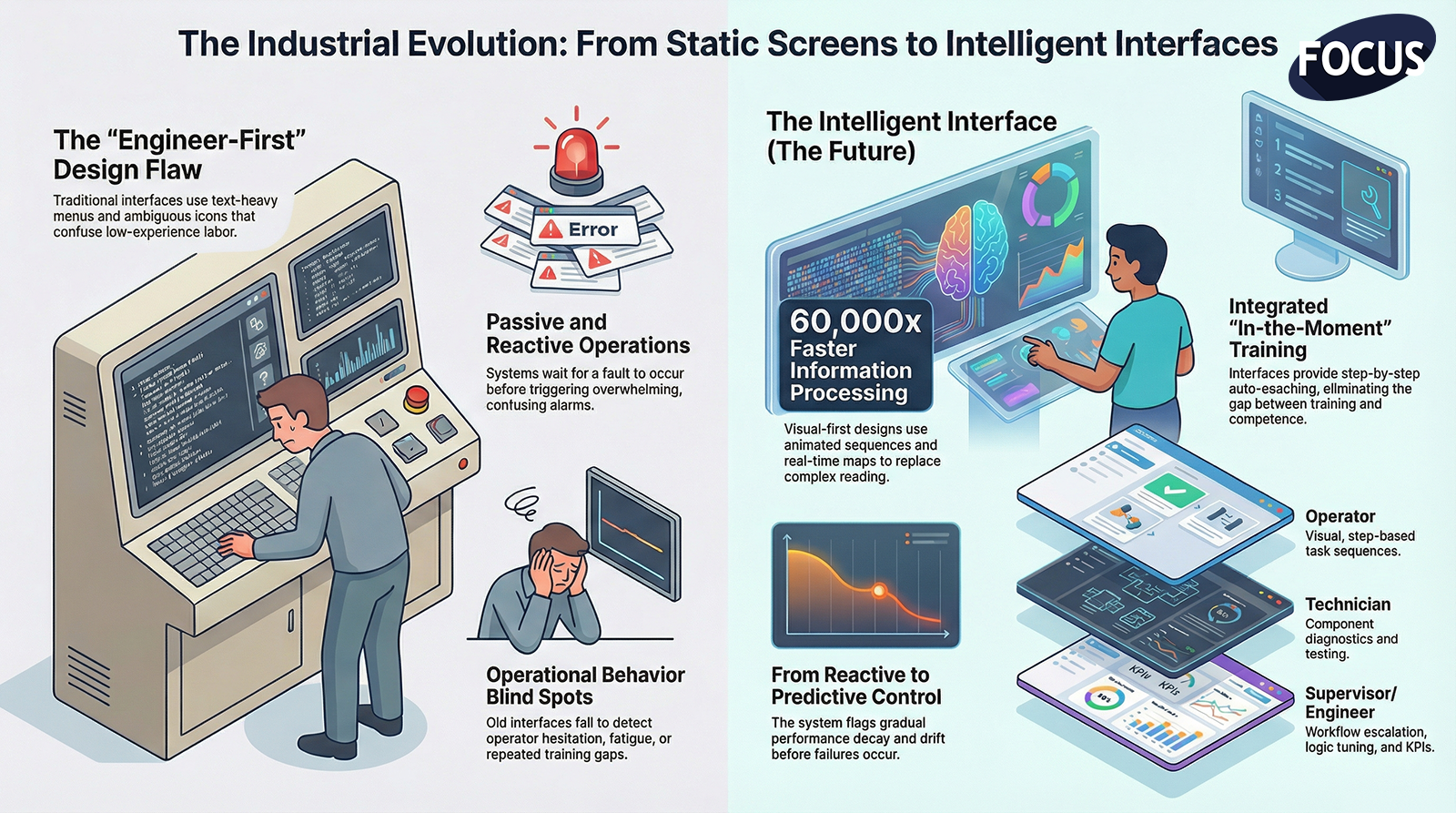
  1. The Old Interface Paradigm Is Breaking Down

Traditional HMIs suffer from:

❌ Text-heavy layouts

❌ Nested menus

❌ Overwhelming alarms

❌ Ambiguous icons

❌ Minimal interactivity

❌ Engineer-first design

❌ Behavior blind spots

❌ Role confusion

These interfaces were never designed for:

  • High turnover
  • Low experience labor
  • Fast automation
  • Predictive technology
  • Multi-machine coordination
  • Visual learning
  • Modern operations

They confuse workers more than they empower them.

The future interface reverses this dynamic completely.

  1. The New Interface Is Visual-First and Text-Minimal

Humans process visual information 60,000× faster than text.

The future HMI uses:

✔ Animated sequences

✔ Real-time machine visualization

✔ Color-coded states

✔ Guided overlays

✔ Component highlighting

✔ Spatial maps

✔ Error illustrations

✔ Touch-based interaction

The user doesn’t need to read the system.
They need to see it.

  1. Intelligent Predictive Interfaces Replace Reactive Screens

Instead of waiting for faults, the future interface:

  • Warns of abnormal drift
  • Predicts failure windows
  • Shows gradual performance decay
  • Flags misalignment patterns
  • Monitors operator hesitation
  • Detects repeated errors
  • Suggests optimal action
  • Recommends improvements

This shifts the factory from reactive to preemptive control.

  1. Multi-Layered Depth Makes Complexity Safe and Simple

The future interface includes:

Operator Layer

Simple, visual, step-based.

Technician Layer

Diagnostics, tests, components.

Engineer Layer

Logic, tuning, configuration.

Supervisor Layer

Workflows, escalation, KPIs.

Everyone gets the interface they need —
not the one-size-fits-none screen of the past.

  1. The Interface Expands Beyond the HMI Screen

Factory interfaces will soon live across:

  • Large displays
  • Tablets
  • Wearable screens
  • Mobile devices
  • Machine towers
  • Digital dashboards
  • AR headsets
  • Multi-station visualization walls

The interface becomes a factory-wide experience, not a 10-inch panel on a steel enclosure.

  1. Direct Human Behavior Feedback Becomes Standard

The future interface understands:

  • Where operators hesitate
  • Which steps confuse them
  • What screens go unused
  • What actions create faults
  • Which instructions fail
  • Training gaps
  • Fatigue patterns
  • Repeated mistakes

This is behavior telemetry, and it enables:

✔ Better UI design

✔ Better workflows

✔ Better training

✔ Better automation

✔ Better safety

The interface starts learning from the people who use it.

  1. Training and Operation Merge Into One System

The future HMI is not a tool —
it is a trainer.

✔ Visual guides

✔ Step sequences

✔ Interactive instructions

✔ Auto-coaching

✔ Skill-level adaptation

✔ In-the-moment training

Operators don’t need to memorize.
The system teaches them as they work.

This eliminates the gap between “trained” and “competent”.

  1. The Interface Becomes the Brainstem of a Connected Factory

The factory interface will integrate:

✔ Robots

✔ Sensors

✔ Quality systems

✔ SCADA

✔ MES

✔ ERP

✔ Maintenance tools

✔ Digital OS layers

✔ Factory displays

Instead of isolated machines, the interface becomes a nervous system connecting every process, every role, and every decision.

  1. Safety Evolves From Passive Warnings to Active Prevention

The future interface doesn’t just show hazards —
it actively prevents unsafe actions.

✔ Guided recovery

✔ Automatic lockouts

✔ Hazard zone visualization

✔ Misuse prevention

✔ Real-time awareness

✔ Operator risk detection

Safety becomes automated, not reactive.

**10. Conclusion:

The Future of the Factory Interface Is Predictive, Visual, Layered, Connected, and Human-Centered**

In the next decade, factories will succeed or fail based on the quality of their interfaces.

The future interface delivers:

✔ Instant clarity

✔ Predictive behavior

✔ Role-based simplicity

✔ Visual guidance

✔ Automated training

✔ Connected intelligence

✔ Real-time telemetry

✔ Faster decision-making

✔ Safer interactions

The best factories won’t have complicated screens.
They’ll have intelligent, adaptive interfaces that empower every worker to succeed — instantly.

This is the next evolution in manufacturing.


FOCUS Integration – Episode 10 – The Future of Factory Interface (Video Notes)

FOCUS Integration – Episode 10 – The Future of Factory Interface (Audio Notes)
 

The HMI as a Digital Coach:

How Modern Interfaces Will Train Workers Automatically On the Line**

Executive Summary

For decades, factories have relied on three fragile systems of training:

  1. Shadowing — which is inconsistent
  2. Tribal knowledge — which is unreliable
  3. Paper SOPs — which nobody reads under pressure

The result?

  • Operators feel unprepared
  • Supervisors feel frustrated
  • Maintenance feels overwhelmed
  • Quality feels unsupported
  • Engineers feel misunderstood
  • Management feels defeated

Training has always been a bottleneck in manufacturing.

But that bottleneck disappears the moment the HMI evolves from a static interface into a dynamic digital coach capable of training workers automatically, continuously, and precisely at the moment instruction is needed.

This is the future of manufacturing skill development.

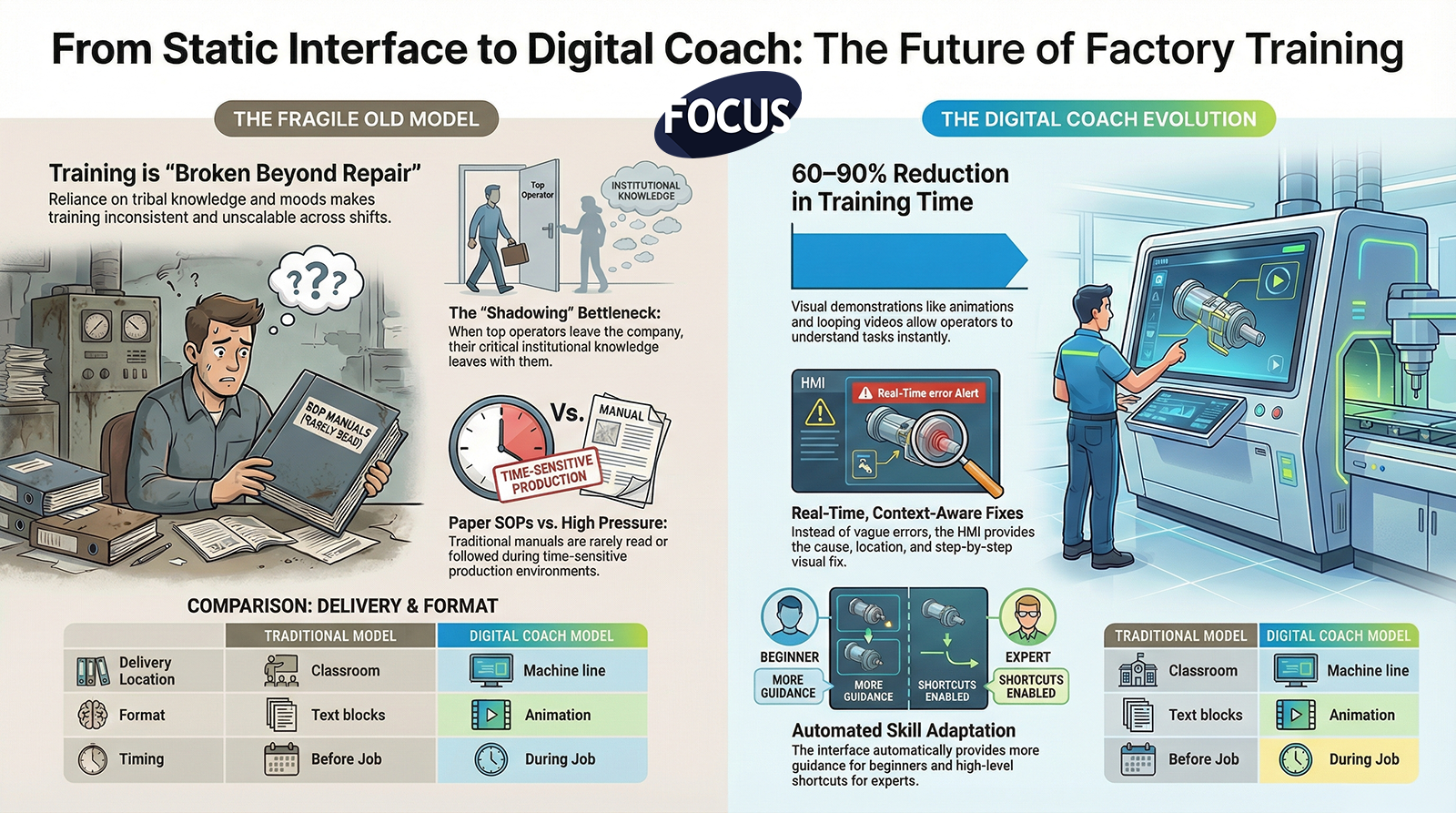
  1. The Old Training Model Is Broken Beyond Repair

Traditional operator training depends on:

  • The trainer’s personality
  • The trainer’s memory
  • The trainer’s mood
  • The trainer’s availability
  • The trainer’s experience
  • And whether the trainee was paying attention that day

This creates massive inconsistencies:

  • Two operators trained on the same machine perform differently
  • Shifts disagree on how things should be done
  • Quality issues appear randomly
  • Maintenance receives vague problem descriptions
  • Safety behaviors vary
  • Supervisors rely on assumptions

Worst of all — when top operators leave, their knowledge leaves with them.

The old model cannot scale.

The digital coach can.

  1. The Digital Coach Lives Inside the HMI

In the next-generation factory, training no longer happens:

  • In classrooms
  • In meetings
  • In binders
  • In notebooks
  • In tribal memory

It happens on the line, through the HMI, during real work.

A digital coach:

  • Shows the operator what to do
  • Demonstrates how to do it
  • Explains why it matters
  • Alerts when something is done incorrectly
  • Corrects the behavior instantly
  • Reinforces good habits
  • Logs training progress
  • Tracks skill competency

This means the HMI doesn’t just control the machine—it develops the worker.

  1. Training Becomes Embedded Into the Job, Not External to It

Traditional training happens before the job.
Digital coaching happens during the job.

This solves multiple issues:

✔ Operators no longer forget steps

✔ Training starts immediately upon hiring

✔ Skill gaps disappear in real time

✔ Operators learn in the exact context the action is needed

✔ Work becomes protected from mistakes

✔ Training is standardized across all shifts

No more:

  • “Well Bob taught me to do it this way.”
  • “I didn’t know that step mattered.”
  • “That’s not how I was trained.”

The HMI becomes the single source of truth.

  1. The Digital Coach Uses Visual Demonstrations, Not Text Blocks

People learn faster through visuals.

The digital coach provides:

  • Animations
  • Short looping videos
  • Photos of real machine components
  • Step illustrations
  • Directional arrows
  • “What good looks like” images
  • Exploded views
  • Before/after comparisons

Operators understand instantly.

This reduces training time by 60–90%.

  1. The Digital Coach Explains Every Alarm and Guides Every Fix

When something goes wrong, the digital coach doesn’t just throw an error on the screen.

It provides:

  1. The cause of the error
  2. The location of the issue
  3. A visual of the component
  4. The step-by-step fix
  5. A check to confirm correction
  6. Suggestions for prevention

This is real-time, context-aware training.

Every alarm becomes a learning moment, not a frustration.

  1. The Digital Coach Adjusts to Operator Skill Level

Beginner operators see:

  • More guidance
  • More steps
  • More visuals
  • Slower pacing
  • Context explanations

Experienced operators see:

  • Shortcut workflows
  • Higher-level options
  • Less hand-holding
  • Advanced troubleshooting

Skill development becomes automated.

  1. The Digital Coach Reinforces Correct Behavior Through Feedback

The HMI acknowledges and builds habits:

  • “Great job — sensor cleared.”
  • “Correct placement detected.”
  • “Verification complete.”
  • “Step executed perfectly.”

Positive reinforcement is one of the most powerful training accelerators.

Small wins build confidence.
Confidence builds independent capability.
Capability builds retention.

  1. The Digital Coach Tracks Competency Automatically

Behind the scenes, the HMI collects data on:

  • Tasks completed
  • Mistakes corrected
  • Steps skipped
  • Time per action
  • Alarm responses
  • Troubleshooting paths taken
  • Required resets
  • Safety confirmations

This data supports:

  • Certification
  • Performance development
  • Supervisor insight
  • Training optimization
  • Career progression

Skill becomes measurable.

And once it’s measurable, it’s manageable.

  1. The Digital Coach Ensures Every Shift Operates Identically

One of the biggest problems in manufacturing is shift-to-shift inconsistency.

The digital coach eliminates this by:

  • Standardizing workflows
  • Enforcing sequence
  • Embedding verification
  • Preventing unauthorized shortcuts
  • Making tribal knowledge irrelevant

Every shift works the same way.
Every operator follows the same steps.
Every machine is run correctly.

Consistency becomes automatic.

**10. Conclusion:

The HMI of the Future Doesn’t Just Display Information — It Teaches.**

Factories used to say:

  • “We can’t find skilled people.”
  • “We don’t have time to train.”
  • “We lose too much knowledge when people leave.”
  • “Operators make too many mistakes.”
  • “Training doesn’t stick.”
  • “Every shift does things differently.”

The Digital Coach solves all of it.

Because the future of manufacturing belongs to the systems that:

  • Teach automatically
  • Guide precisely
  • Correct instantly
  • Reduce cognitive load
  • Build confidence
  • Protect quality
  • Speed up training
  • Eliminate guesswork

This isn’t just a new HMI.

This is a new model for how humans learn and perform inside a factory.

It changes everything.

FOCUS Integration – Episode 7 – The HMI as a Digital Coach (Video Notes)


FOCUS Integration – Episode 7 – The HMI as a Digital Coach (Audio Notes)


Cognitive Load Crisis

The Cognitive Load Crisis:

Why Modern Factories Are Overwhelming Workers (and How HMIs Must Fix It)**

Executive Summary

The modern factory has evolved faster than the human mind’s ability to keep up.

Automation has accelerated.
Production has intensified.
Complexity has multiplied.
Turnover has skyrocketed.

But human cognitive limits have not changed.

Operators, technicians, and supervisors are drowning in:

  • Alarms
  • Data
  • Steps
  • Screens
  • Instructions
  • Decisions
  • Distractions
  • Variability
  • Pressure

This overload creates errors, slows production, causes safety incidents, increases scrap, and drives people out of the industry.

This is not a performance problem.
This is not a training problem.
This is not a motivation problem.

This is a cognitive load problem — and modern HMIs must be redesigned to solve it.

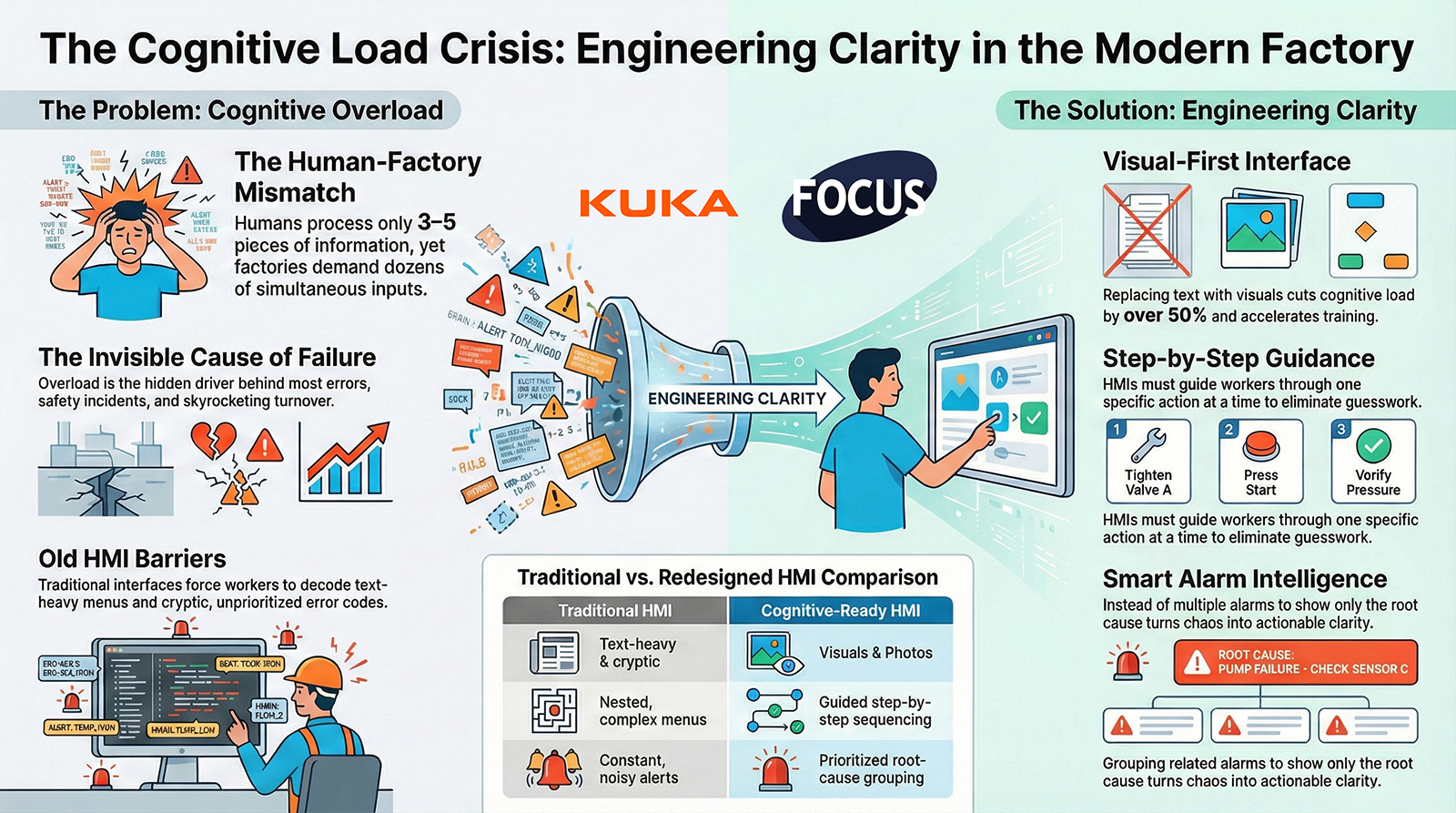
  1. Humans Have Cognitive Limits — Factories Act Like They Don’t

The human brain can only process:

  • 3–5 pieces of new information at one time
  • Simple sequences
  • Clear visuals
  • Low ambiguity
  • Tasks with immediate feedback

But factories expect workers to juggle:

✔ Dozens of screens

✔ Multiple simultaneous alarms

✔ Complex mechanical understanding

✔ Tribal instructions

✔ Machine timing

✔ Quality expectations

✔ Safety rules

✔ Changeover steps

✔ Downtime pressure

The mismatch between expectation and ability is the root of modern operational chaos.

  1. Cognitive Overload Causes Most Factory Problems

When workers are mentally overwhelmed, they:

❌ Make mistakes

❌ Forget steps

❌ Miss cues

❌ React slowly

❌ Skip instructions

❌ Trigger faults

❌ Misinterpret alarms

❌ Perform unsafe actions

❌ Lose confidence

❌ Quit

Cognitive overload is not visible —
it’s not like a broken machine or a red alarm light —
but it is the invisible force behind most operational instability.

  1. Old HMIs Make Cognitive Load Worse

Traditional HMIs were built for engineers:

  • Tiny buttons
  • Text-heavy screens
  • Nested menus
  • Cryptic errors
  • Parameter overload
  • No visual hierarchy
  • No prioritization
  • No sequencing
  • No simplification

These interfaces increase cognitive load by forcing workers to interpret, decode, remember, and guess.

This is unacceptable in the modern factory.

  1. The Cognitive Load Crisis Hits New Workers the Hardest

New workers:

  • Have no tribal knowledge
  • Are less mechanically familiar
  • Need visual learning
  • Are overwhelmed by too much text
  • Lose confidence quickly
  • Leave if the job feels chaotic

If a new worker is overloaded in the first hour,
they will not survive the first week.

The HMI must make the factory understandable to the inexperienced instantly.

  1. Cognitive Load Must Be Engineered Down at the Interface Level

The only scalable solution is to redesign HMIs to:

✔ Reduce information quantity

✔ Prioritize essential tasks

✔ Show only what matters now

✔ Use visuals instead of text

✔ Guide step-by-step

✔ Predict what the user needs

✔ Block incorrect actions

✔ Minimize decision-making

✔ Highlight the critical path

✔ Reduce noise from alarms

This is how you engineer clarity.

This is how you reduce cognitive demand.

  1. The HMI Must Tell Workers EXACTLY What to Do — One Step at a Time

Cognitive load drops dramatically when workers are not asked to:

  • Remember sequences
  • Interpret ambiguous instructions
  • Decode technical jargon
  • Navigate unfamiliar screens
  • Make high-risk decisions under pressure

A modern HMI should guide:

✔ Step 1 → do this

✔ Step 2 → now this

✔ Step 3 → verify

✔ Step 4 → confirm

Nothing more.
Nothing less.
Nothing confusing.

This transforms performance.

  1. Visual-First Design Cuts Cognitive Load by Over 50%

When you replace text with visuals:

  • Recognition replaces interpretation
  • Processing is instant
  • Error rates drop
  • Training accelerates
  • Stress levels fall
  • Memory burden disappears

Examples:

  • Green check / red X visuals
  • Animated steps
  • Photos of correct positions
  • Side-by-side quality comparisons
  • Highlighted sensor locations
  • Visual zone maps

Humans are visual.
HMIs must reflect that.

  1. Smarter Alarm Systems Reduce Cognitive Load During Chaos

Alarms overwhelm workers:

  • Too many
  • Too cryptic
  • Too technical
  • Too frequent
  • Too urgent
  • Too unclear

Modern alarm intelligence:

✔ Groups related alarms

✔ Prioritizes the root cause

✔ Hides nuisance alarms

✔ Shows only the actionable step

✔ Provides a visual recovery guide

This turns alarm storms into clarity storms.

  1. Reducing Cognitive Load Increases Speed, Quality, and Safety

When cognitive load is low:

✔ Operators move faster

✔ Recovery times shrink

✔ Mistakes disappear

✔ Safety improves

✔ Training becomes easy

✔ Turnover drops

✔ Consistency rises

✔ Confidence skyrockets

Humans perform at their best when the system supports them instead of overwhelming them.

**10. Conclusion:

Solving the Cognitive Load Crisis Is the Key to the Modern Factory**

Factories don’t fail because people are bad at their jobs.
Factories fail because systems overwhelm people.

The Cognitive Load Crisis is the invisible barrier stopping:

  • Training effectiveness
  • Standard work
  • Safety culture
  • Quality performance
  • Operational speed
  • Employee retention
  • Automation readiness

Modern HMIs can fix this by:

✔ Simplifying

✔ Visualizing

✔ Prioritizing

✔ Sequencing

✔ Predicting

✔ Guiding

✔ Supporting

This is not a UX upgrade.
This is a workforce revolution.

Reducing cognitive load is how factories survive the next decade.


FOCUS Integration – Episode 5 – Cognitive Load Crisis (Video Notes)


FOCUS Integration – Episode 5 – Cognitive Load Crisis (Audio Notes)


beyond dashbaords

Beyond OEE Dashboards:

What a True Factory Operating System Should Actually Do**

Executive Summary

For years, manufacturers have been told that digital transformation begins with dashboards — colorful displays of OEE, downtime, scrap rates, and production numbers. And while dashboards are useful, they are also deeply limited.

Dashboards report.
Factories must operate.

A dashboard can tell you that production is behind.
A factory operating system (FOS) tells you why, what to do next, and who needs to do it.

Dashboards visualize data.
A factory operating system drives behavior.

Dashboards live in conference rooms and supervisor offices.
A factory operating system lives on the shop floor, powering decision-making for operators, technicians, supervisors, and leadership in real time.

This article explores why dashboards alone cannot unlock modern manufacturing performance — and what a real operating system must provide to make the factory safer, smarter, faster, and more resilient.

  1. The Problem with Dashboard-Centric Thinking

Over the past decade, many manufacturers invested heavily in:

  • OEE dashboards
  • Downtime reporting tools
  • Production-monitoring apps
  • Custom spreadsheets
  • Office-based KPI displays

But a shocking number of these systems have failed to deliver real value.

Why?

Because dashboards have three critical limitations:

Limitation #1 — Dashboards show the symptom, not the cause

A dashboard can tell you:

  • OEE dropped
  • Scrap spiked
  • Throughput slowed
  • Downtime increased

But dashboards do not tell you:

  • Who was involved
  • What happened before the issue
  • What procedure was followed
  • What operator actions led to the failure
  • Which workflow broke down
  • How the issue should be escalated

Dashboards are mirrors — not maps.

Limitation #2 — Dashboards don’t change operator behavior

Operators don’t stare at dashboards.
They stare at machines, parts, workstations, and paperwork.

By the time someone looks at the dashboard, the problem already happened.

Dashboards are backward-looking.
Factory operations must be forward-guiding.

Limitation #3 — Dashboards live in offices, not on the floor

Operators need:

  • Prompts
  • Warnings
  • Clear instructions
  • Escalation paths
  • Contextual guidance

Dashboards don’t provide these.

Most dashboards serve leadership, not frontline workers.

  1. What Is a Factory Operating System?

A factory operating system (FOS) is a unified digital layer that connects:

  • Machines
  • People
  • Data
  • Workflows
  • Safety systems
  • Quality systems
  • Material movement
  • Planning and scheduling
  • Training and procedures
  • Visual management boards

It replaces the patchwork of:

  • Clipboards
  • Whiteboards
  • Paper SOPs
  • Radio calls
  • Tribal knowledge
  • Disconnected software

with a single architecture that governs how the factory runs.

The FOS becomes the brain and nervous system of the plant — coordinating information flow and guiding action in real time.

  1. The Five Core Capabilities of a True Factory Operating System

Dashboards only provide one of these five.
A complete factory OS must do all of them.

  1. Real-Time Visibility (Dashboards + Visual Boards + Alerts)

Yes, dashboards matter — but in the context of a larger system.

A factory OS must:

  • Display live performance
  • Show safety and quality metrics
  • Highlight abnormalities instantly
  • Provide takt time tracking
  • Surface deviations visually on the shop floor

This is the information layer.

But it is not enough on its own.

  1. Standardized Workflows and Digital Procedures

A real factory cannot rely on memory or inconsistent training.

A true FOS must:

  • Deliver step-by-step instructions
  • Enforce sequence control
  • Provide verification steps
  • Allow quick updates to procedures
  • Record who did what and when
  • Support photos, videos, diagrams, and AR

This is the execution layer.

It ensures every worker performs the task correctly every time.

  1. Role-Based Guidance and Escalation

When something goes wrong, workers should not guess:

  • Who to call
  • What to do
  • Where to go
  • What standard to follow
  • What the priority is

A real operating system:

  • Offers guided troubleshooting
  • Auto-assigns the right responder
  • Sends multi-channel alerts
  • Displays the issue on nearby screens
  • Tracks response time
  • Ensures follow-through

This is the coordination layer.

It prevents chaos, confusion, and delay.

  1. Integrated Human + Machine Intelligence

A factory OS must combine:

  • Machine data (PLC signals, sensors)
  • Operator actions (inputs, responses, observations)
  • Environmental data
  • Quality measurements
  • Maintenance records

This enables:

  • Real root cause analysis
  • Predictive maintenance
  • Better staffing decisions
  • Quality interventions
  • Energy optimization

This is the insight layer.

Dashboards cannot do this alone — they only display the data, not integrate it into workflows.

  1. Continuous Improvement and Governance

A digital OS must support:

  • Kaizen
  • Tier meetings
  • Issue logging
  • Action item tracking
  • Multi-shift continuity
  • Skills matrices
  • Audit trails

It enforces the rhythm of improvement the same way an ERP enforces financial structure.

This is the governance layer.

It ensures the factory doesn’t drift into tribal processes or “hero culture.”

  1. The Key Insight: Dashboards Measure Performance — Operating Systems Improve It

A dashboard can show that downtime increased.
A real factory OS:

  • Shows the downtime
  • Identifies the cause
  • Traces operator actions
  • Triggers standard troubleshooting steps
  • Notifies the right person
  • Displays the escalation on big boards
  • Tracks progress
  • Captures lessons learned
  • Updates the workflow to prevent recurrence

Dashboards are passive.
A factory operating system is active.

Dashboards observe.
A factory OS intervenes.

  1. Why the Shift Away From Dashboard-Only Thinking Is Accelerating

Manufacturers are realizing that:

You cannot manage today’s workforce with yesterday’s tools.

Frontline workers need structured digital guidance, not analog instructions.

You cannot manage today’s automation with yesterday’s workflows.

Robot cells, AGVs, and complex machinery require coordinated responses, not manual improvisation.

You cannot manage today’s scheduling and demand with yesterday’s visibility.

Real-time data is essential for meeting takt, not historical reports.

A dashboard-only approach is like trying to run a modern car with only a speedometer — and none of the warning systems, navigation, automation, or driver assistance features.

  1. What the Factory of the Future Will Look Like

The next generation of factories will be built around:

A shared visual layer

Large screens showing live performance, safety, and priority signals for everyone.

A digital nervous system

Operators, machines, and workflows connected through one OS.

Automated coordination

Escalations routed intelligently by role and urgency.

Standardization across sites

One system, one language, one way of working.

Operators empowered with guidance

Not just told what happened — shown what to do.

Data becoming behavior

Not just numbers — actions.

The difference between a dashboard-driven plant and an OS-driven plant will soon be as dramatic as the difference between a flip phone and a smartphone.

Conclusion: Dashboards Are the Beginning, Not the Destination

Modern factories require more than visibility.
They require structure, coordination, and real-time behavior shaping.

A dashboard tells you what happened.
A factory operating system makes the right thing happen.

This is the future of operational excellence:

  • Connected
  • Guided
  • Standardized
  • Visualized
  • Coordinated
  • Scalable

Dashboards alone cannot transform a factory.
A factory OS can transform everything.


FOCUS Integration – Episode 3 – Beyond Dashboards (Video Notes)


FOCUS Integration – Episode 3 – Beyond Dashboards (Audio Notes)